> ## Documentation Index
> Fetch the complete documentation index at: https://docs.lumovi.dev/llms.txt
> Use this file to discover all available pages before exploring further.
# Shells on nodes
> Open a shell on a node itself, as root, or in a privileged pod with the node's files, like kubectl debug node.
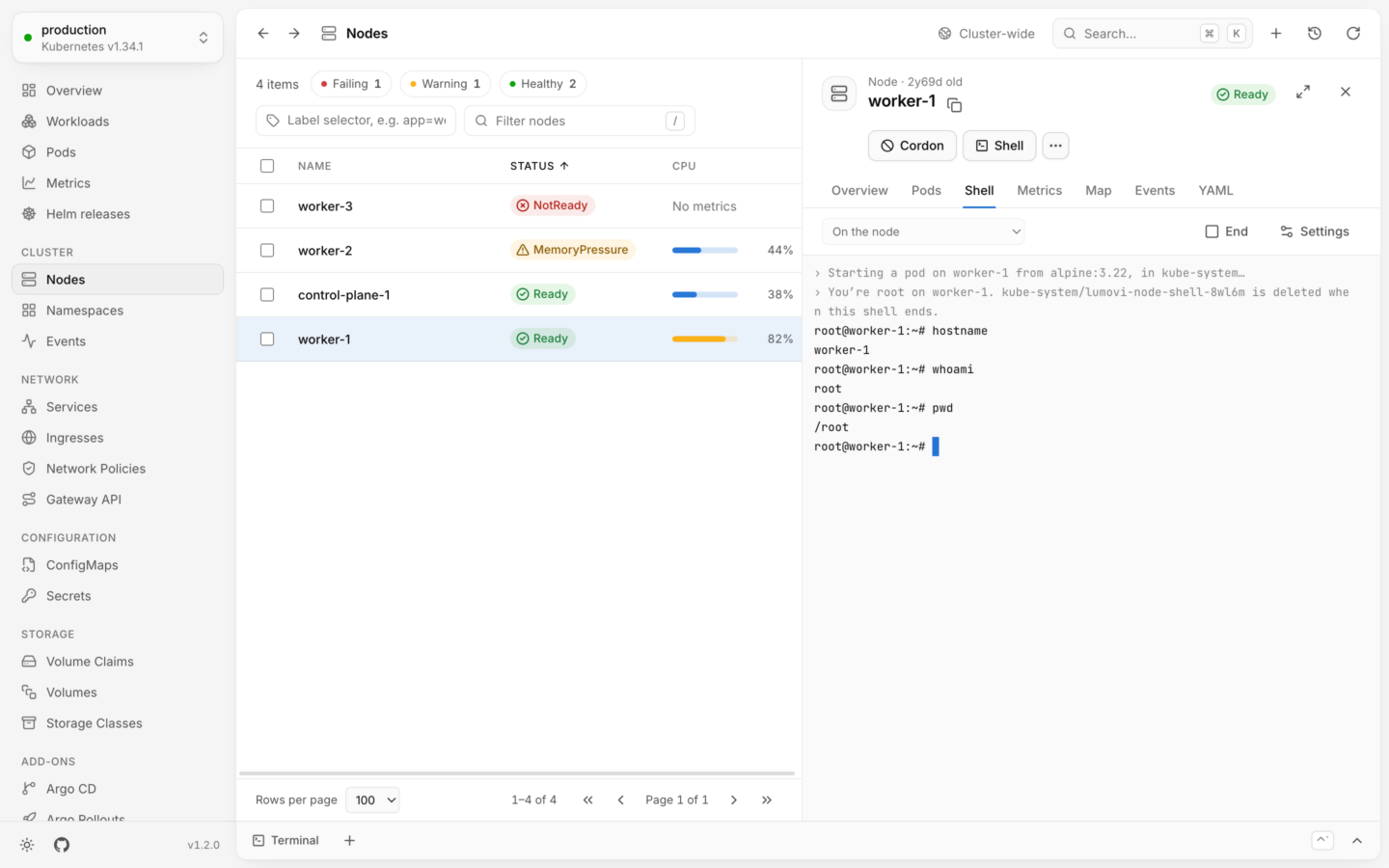
Some problems aren't in a container but on the node under it: the kubelet, the container runtime, a full disk, the node's network. A node's **Shell** tab opens a shell there, like `kubectl debug node`. Lumovi starts a short-lived privileged pod on the node, opens a shell through it, and deletes the pod when the shell ends. You don't need SSH access to the node: your RBAC, and the Pod Security of the namespace the pod runs in, decide whether you can.
 For a shell in a container, see [Shells and debug containers](/debug/shell).
## Open a shell on a node
Find it in [Nodes](/explore/nodes), and open it.
Choose **Shell** at the top of the panel, or open the **Shell** tab. Nothing starts yet: the tab says what will happen first.
**On the node**, the default, or **In the pod, with the node's files**, from the menu at the top of the tab. See [Where the shell runs](#where-the-shell-runs).
Choose **Start shell**. The terminal shows each step as it happens, and the shell opens once the node has started the pod.
Before you start, the tab says what Lumovi will create:
| | Shows |
| - | - |
| **Pod** | Where it's created, and its name: `kube-system/lumovi-node-shell-…` by default |
| **Image** | What it runs: `alpine:3.22` by default |
| **Access** | Privileged, with the node's processes, network and files |
It also warns you, though you can still start the shell:
| When | It says |
| - | - |
| The node isn't ready | *node* isn't ready: its kubelet may not start the pod. |
| Your account can't delete pods in the namespace | Your account can't delete pods in *namespace*: the pod stays until its 12-hour deadline. |
Then the terminal says what's happening, in dim lines before the shell's own:
```text theme={"theme":{"light":"github-light","dark":"github-dark-default"}}
› Starting a pod on worker-1 from alpine:3.22, in kube-system…
› You’re root on worker-1. kube-system/lumovi-node-shell-x7k2p is deleted when this shell ends.
```
Lumovi waits up to two minutes for the node to pull the image and start the pod.
The terminal works like a container's. See [In the terminal](/debug/shell#in-the-terminal). **End**, at the top of the tab, ends the shell and deletes its pod.
## Where the shell runs
| Where | What you get |
| - | - |
| **On the node** | Root on the node. The shell runs in the node's own mount, UTS, IPC, network and PID namespaces, through `nsenter`, so you see the node's files, tools, processes and network as the node does. It's the node's `bash` when it has one, and `sh` otherwise, as a login shell in root's home directory. |
| **In the pod, with the node's files** | A login shell from the pod's image, starting in `/host`, where the node's files are. The pod shares the node's processes and network too. This is for nodes without a shell of their own, like Talos and Bottlerocket. |
What Lumovi runs in the pod. On the node, it first checks that the image has `nsenter`, so a missing one says so instead of looking like a node without a shell:
```bash On the node theme={"theme":{"light":"github-light","dark":"github-dark-default"}}
env TERM=xterm-256color nsenter --target 1 --mount --uts --ipc --net --pid -- sh -c 'cd ~ 2>/dev/null; command -v bash >/dev/null 2>&1 && exec bash -l || exec sh -l'
```
```bash In the pod theme={"theme":{"light":"github-light","dark":"github-dark-default"}}
env TERM=xterm-256color sh -c 'cd /host && exec sh -l'
```
Where a shell runs can't change while it's open: choose **End** first.
## The pod
Lumovi creates a pod named `lumovi-node-shell-` and five random characters, in the node shells' namespace (`kube-system` unless you [choose another](#settings-for-each-cluster)). It's:
* **Privileged**, sharing the node's process, network and IPC namespaces, with the node's root filesystem mounted at `/host`.
* **Placed on the node** by name rather than scheduled, and it tolerates every taint, so cordoned and tainted nodes get it too.
* **Without a service account token**: it has no access to the API of its own.
* **Labeled** `app.kubernetes.io/managed-by: lumovi` and `app.kubernetes.io/component: node-shell`, with the node's name in its `lumovi.dev/node` annotation.
For `worker-1`, with the default settings. The API server adds the five random characters to its name.
```yaml theme={"theme":{"light":"github-light","dark":"github-dark-default"}}
apiVersion: v1
kind: Pod
metadata:
generateName: lumovi-node-shell-
namespace: kube-system
labels:
app.kubernetes.io/managed-by: lumovi
app.kubernetes.io/component: node-shell
annotations:
lumovi.dev/node: worker-1
spec:
nodeName: worker-1
tolerations:
- operator: Exists
hostPID: true
hostNetwork: true
hostIPC: true
restartPolicy: Never
terminationGracePeriodSeconds: 0
activeDeadlineSeconds: 43200
automountServiceAccountToken: false
enableServiceLinks: false
containers:
- name: shell
image: alpine:3.22
command: ['sleep', '43200']
securityContext:
privileged: true
volumeMounts:
- name: host
mountPath: /host
volumes:
- name: host
hostPath:
path: /
```
### How long it lives
As long as the shell. Lumovi deletes the pod at once when the shell ends, which it does when:
* You choose **End**, or the shell exits.
* The connection to the pod closes.
* You open another of the panel's tabs, open something else, or close the panel.
* You quit the desktop app, which waits a few seconds for the pod to go, or leave the page in a browser.
The terminal says what became of it: **Its pod was deleted.** If Lumovi couldn't delete it, because your account can't delete pods there or the API server didn't answer, it says so instead, also when the shell failed to start:
> Lumovi couldn't delete its pod, kube-system/lumovi-node-shell-x7k2p: *why*. It stops by itself within 12 hours.
That's the pod's deadline. Its container only sleeps for 12 hours, and Kubernetes stops the pod then too (`activeDeadlineSeconds`), even when Lumovi isn't there to delete it, because the desktop app quit before it could, say. A stopped pod stays in the namespace until it's deleted. To find the node shells' pods:
```bash theme={"theme":{"light":"github-light","dark":"github-dark-default"}}
kubectl get pods -n kube-system -l app.kubernetes.io/component=node-shell
```
## Settings for each cluster
Choose **Settings** at the top of the **Shell** tab. The **Node shells** dialog says where the pod is created, and what it runs:
| Field | What it is |
| - | - |
| **Namespace** | Where the pod is created. Its Pod Security must allow privileged pods, as `kube-system`'s usually does. A namespace's name: lowercase letters, digits and `-`. |
| **Image** | What the pod runs. It needs a shell (`sh`), and `nsenter` for shells on the node itself: `alpine` has both. Where nodes can't pull from Docker Hub, use a copy in your own registry, like `registry.example.com/library/alpine:3.22`. |
**Save** keeps them for this cluster, once the namespace is a namespace's name and the image has no spaces. The next shell uses them; one that's open keeps going. Once you've set your own, **Use the defaults: kube-system, alpine:3.22** goes back to the defaults.
The desktop app keeps these settings with its others, by kubeconfig context. In a browser, Lumovi in your cluster keeps them in that browser, for each cluster: another browser, or another person, has its own.
### The equivalent command
The dialog shows the `kubectl debug node` command that does much the same, for where the shell runs:
```bash theme={"theme":{"light":"github-light","dark":"github-dark-default"}}
kubectl debug node/worker-1 -it --image alpine:3.22 --profile sysadmin -n kube-system --context dev -- nsenter --target 1 --mount --uts --ipc --net --pid -- sh -l
```
In the pod, the command ends in `-- sh -l`. Unlike Lumovi, `kubectl debug node` leaves its pod behind when the shell ends: delete it yourself.
**In your cluster:** the administrator sets the namespace and image everyone starts with, with the chart's `nodeShell.namespace` and `nodeShell.image` (`LUMOVI_NODE_SHELL_NAMESPACE` and `LUMOVI_NODE_SHELL_IMAGE`), and can turn node shells off for everyone with `nodeShell.enabled: false` (`LUMOVI_NODE_SHELL=off`). In a fleet, these are every cluster's. Each person can still choose another namespace and image for themselves, kept in their browser, and **Use the defaults** goes back to the server's. The pod is created, and the shell opened, as the person signed in, with their RBAC: not as Lumovi's service account. When Lumovi itself stops, after an upgrade say, it waits up to 10 seconds for open node shells' pods to be deleted. See [Helm values](/server/helm-values) and [Security](/server/security#shells-on-nodes).
## What it needs
### Permissions
All in the node shells' namespace:
| To | Needs |
| - | - |
| Create the pod | `create` on `pods` |
| See it start | `get` on `pods` |
| Open the shell in it | `create` on `pods/exec` |
| Delete it when the shell ends | `delete` on `pods`. Without it, the pod stays until its 12-hour deadline. |
Lumovi asks the cluster before you start. Without `create` or `get` on `pods`, or `create` on `pods/exec`, the tab says **No node shell access**: *Your account can't create pods in kube-system, read them, or open shells in them. A node shell needs all three: ask for them, or choose another namespace in its settings.* See [Permissions](/clusters/permissions).
Bind it to the people who may be root on the cluster's nodes, in the namespace node shells run in:
```yaml theme={"theme":{"light":"github-light","dark":"github-dark-default"}}
apiVersion: rbac.authorization.k8s.io/v1
kind: Role
metadata:
name: lumovi-node-shell
namespace: kube-system
rules:
- apiGroups: [""]
resources: ["pods"]
verbs: ["create", "get", "delete"]
- apiGroups: [""]
resources: ["pods/exec"]
verbs: ["create"]
```
Creating pods in a namespace that allows privileged pods is enough to be root on any node. Give it only to those who should be.
### Pod Security
The namespace's [Pod Security](https://kubernetes.io/docs/concepts/security/pod-security-admission/) level must be `privileged`: a namespace whose `pod-security.kubernetes.io/enforce` label is `baseline` or `restricted` refuses the pod. `kube-system` usually allows privileged pods. Policy engines, like Kyverno or Gatekeeper, can refuse it too.
### The image
The default, `alpine:3.22`, comes from Docker Hub. It has `sh` and `nsenter`, which shells on the node need. A shell in the pod needs only `sh`. Where nodes can't pull from Docker Hub, or shouldn't, copy the image to your own registry and set it in [Settings](#settings-for-each-cluster).
## When it doesn't start
Whenever a shell can't start, Lumovi deletes its pod, and says why in words that say what to do. Most messages come with **Settings** and **Try again**: after you save the settings, the tab goes back to the start.
***namespace* doesn't allow privileged pods: its Pod Security level is stricter than privileged. Choose a namespace that allows them in the node shell's settings.**
Choose **Settings**, and a namespace whose Pod Security level is `privileged`, like `kube-system`. See [Pod Security](#pod-security).
**Lumovi couldn't create the node shell's pod:** *what Kubernetes said*
Kubernetes refused it for another reason, in its own words: your account can't create pods there, a quota is full, or a policy refused it. Fix what it names, or choose another namespace in **Settings**.
***node* couldn't start *image* (ErrImagePull): *why*. Choose an image it can pull in the node shell's settings.**
The reason in brackets is the container's: `ErrImagePull`, `ImagePullBackOff`, `InvalidImageName`, `ErrImageNeverPull`, `CreateContainerConfigError` or `CreateContainerError`. Check the image's name, or choose a copy in a registry the node can reach, in **Settings**.
***node* refused the node shell's pod (OutOfpods):** *why*
The node's kubelet turned the pod down, and the reason and message in it are the kubelet's. `OutOfpods`, for one, means the node already runs as many pods as it can.
***node* didn't start the node shell's pod in 120 seconds: its kubelet may not be running, or *image* may take long to pull.**
Lumovi waits six times `LUMOVI_REQUEST_TIMEOUT_MS`, two minutes unless it's set. Check the node's status and its conditions in [Nodes](/explore/nodes): a node that isn't ready may never start the pod. A large image may only need longer: **Try again** once the node has pulled it.
***node* has no shell of its own.** *Talos and Bottlerocket nodes, say, have none. The pod's shell has the node's files under /host.*
Choose **Shell in the pod** for a shell in the pod instead, with the node's files under `/host`. Lumovi says this only when a shell on the node ends that way before you've typed anything: afterwards, the code is the last command's.
***image* has no nsenter.** *A shell on the node itself runs the image's nsenter: alpine has it. (A shell in the pod doesn't need it.)*
Its pod was deleted. Choose another image in **Settings**, like `alpine`, then **Try again**, or choose **In the pod**, which doesn't need `nsenter`.
***image* has no shell.** *A node shell's image needs sh, and nsenter for shells on the node itself: alpine has both.*
Distroless images, say, have none. Choose another image in **Settings**, then **Try again**.
## When it ends
| Message | Means |
| - | - |
| The shell exited with code N. | You exited, or the shell did. |
| The connection to the container closed. | The pod stopped, or the network dropped. |
Under it, **Its pod was deleted.**, or why it couldn't be. **Start again** starts a new shell, in a new pod.
## When a node shell isn't offered
| You see | Why | What to do |
| - | - | - |
| **Shells are off** | The cluster is [read-only](/changes/read-only) in Lumovi: a node shell can change the node. The **Shell** button is disabled too. | Allow changes to the cluster, if you mean to. |
| **No node shell access** | Your account can't create pods in the node shells' namespace, read them, or open shells in them. | Ask for them, or choose another namespace in **Settings**. See [Permissions](#permissions). |
| **Node shells need a Linux node** | The node runs Windows. | None: see [Windows nodes](#windows-nodes). |
| **Node shells are off** | The Lumovi server you use turned them off, with `nodeShell.enabled: false`. | Ask its administrator. |
### Windows nodes
Windows nodes can't have a node shell: their containers can't share a node's namespaces the way a node shell needs. Their **Shell** tab says **Node shells need a Linux node**.
### Read-only clusters
A read-only cluster turns shells off, on nodes too. The **Shell** tab says **Shells are off**, as the cluster is read-only in Lumovi and a node shell can change the node. It isn't only the tab: the part of Lumovi that talks to the cluster refuses to start one. See [Read-only mode](/changes/read-only).
## Security
A shell on a node is root on that node, and so is a shell in its pod: it can read the node's files, the kubelet's credentials, and the Secrets and volumes of every pod on the node, and change all of them. Lumovi gives nobody more than their RBAC allows: whoever can open a node shell could create the same pod with `kubectl`. To keep people from it, let them create pods only in namespaces that don't allow privileged pods. See [Security in your cluster](/server/security#shells-on-nodes).
A shell in a container, or a debug container with tools.
Every node's health and load, and ways to take one out of service.
This documentation is built and hosted on [Mintlify](https://mintlify.com), a developer documentation platform.
For a shell in a container, see [Shells and debug containers](/debug/shell).
## Open a shell on a node
Find it in [Nodes](/explore/nodes), and open it.
Choose **Shell** at the top of the panel, or open the **Shell** tab. Nothing starts yet: the tab says what will happen first.
**On the node**, the default, or **In the pod, with the node's files**, from the menu at the top of the tab. See [Where the shell runs](#where-the-shell-runs).
Choose **Start shell**. The terminal shows each step as it happens, and the shell opens once the node has started the pod.
Before you start, the tab says what Lumovi will create:
| | Shows |
| - | - |
| **Pod** | Where it's created, and its name: `kube-system/lumovi-node-shell-…` by default |
| **Image** | What it runs: `alpine:3.22` by default |
| **Access** | Privileged, with the node's processes, network and files |
It also warns you, though you can still start the shell:
| When | It says |
| - | - |
| The node isn't ready | *node* isn't ready: its kubelet may not start the pod. |
| Your account can't delete pods in the namespace | Your account can't delete pods in *namespace*: the pod stays until its 12-hour deadline. |
Then the terminal says what's happening, in dim lines before the shell's own:
```text theme={"theme":{"light":"github-light","dark":"github-dark-default"}}
› Starting a pod on worker-1 from alpine:3.22, in kube-system…
› You’re root on worker-1. kube-system/lumovi-node-shell-x7k2p is deleted when this shell ends.
```
Lumovi waits up to two minutes for the node to pull the image and start the pod.
The terminal works like a container's. See [In the terminal](/debug/shell#in-the-terminal). **End**, at the top of the tab, ends the shell and deletes its pod.
## Where the shell runs
| Where | What you get |
| - | - |
| **On the node** | Root on the node. The shell runs in the node's own mount, UTS, IPC, network and PID namespaces, through `nsenter`, so you see the node's files, tools, processes and network as the node does. It's the node's `bash` when it has one, and `sh` otherwise, as a login shell in root's home directory. |
| **In the pod, with the node's files** | A login shell from the pod's image, starting in `/host`, where the node's files are. The pod shares the node's processes and network too. This is for nodes without a shell of their own, like Talos and Bottlerocket. |
What Lumovi runs in the pod. On the node, it first checks that the image has `nsenter`, so a missing one says so instead of looking like a node without a shell:
```bash On the node theme={"theme":{"light":"github-light","dark":"github-dark-default"}}
env TERM=xterm-256color nsenter --target 1 --mount --uts --ipc --net --pid -- sh -c 'cd ~ 2>/dev/null; command -v bash >/dev/null 2>&1 && exec bash -l || exec sh -l'
```
```bash In the pod theme={"theme":{"light":"github-light","dark":"github-dark-default"}}
env TERM=xterm-256color sh -c 'cd /host && exec sh -l'
```
Where a shell runs can't change while it's open: choose **End** first.
## The pod
Lumovi creates a pod named `lumovi-node-shell-` and five random characters, in the node shells' namespace (`kube-system` unless you [choose another](#settings-for-each-cluster)). It's:
* **Privileged**, sharing the node's process, network and IPC namespaces, with the node's root filesystem mounted at `/host`.
* **Placed on the node** by name rather than scheduled, and it tolerates every taint, so cordoned and tainted nodes get it too.
* **Without a service account token**: it has no access to the API of its own.
* **Labeled** `app.kubernetes.io/managed-by: lumovi` and `app.kubernetes.io/component: node-shell`, with the node's name in its `lumovi.dev/node` annotation.
For `worker-1`, with the default settings. The API server adds the five random characters to its name.
```yaml theme={"theme":{"light":"github-light","dark":"github-dark-default"}}
apiVersion: v1
kind: Pod
metadata:
generateName: lumovi-node-shell-
namespace: kube-system
labels:
app.kubernetes.io/managed-by: lumovi
app.kubernetes.io/component: node-shell
annotations:
lumovi.dev/node: worker-1
spec:
nodeName: worker-1
tolerations:
- operator: Exists
hostPID: true
hostNetwork: true
hostIPC: true
restartPolicy: Never
terminationGracePeriodSeconds: 0
activeDeadlineSeconds: 43200
automountServiceAccountToken: false
enableServiceLinks: false
containers:
- name: shell
image: alpine:3.22
command: ['sleep', '43200']
securityContext:
privileged: true
volumeMounts:
- name: host
mountPath: /host
volumes:
- name: host
hostPath:
path: /
```
### How long it lives
As long as the shell. Lumovi deletes the pod at once when the shell ends, which it does when:
* You choose **End**, or the shell exits.
* The connection to the pod closes.
* You open another of the panel's tabs, open something else, or close the panel.
* You quit the desktop app, which waits a few seconds for the pod to go, or leave the page in a browser.
The terminal says what became of it: **Its pod was deleted.** If Lumovi couldn't delete it, because your account can't delete pods there or the API server didn't answer, it says so instead, also when the shell failed to start:
> Lumovi couldn't delete its pod, kube-system/lumovi-node-shell-x7k2p: *why*. It stops by itself within 12 hours.
That's the pod's deadline. Its container only sleeps for 12 hours, and Kubernetes stops the pod then too (`activeDeadlineSeconds`), even when Lumovi isn't there to delete it, because the desktop app quit before it could, say. A stopped pod stays in the namespace until it's deleted. To find the node shells' pods:
```bash theme={"theme":{"light":"github-light","dark":"github-dark-default"}}
kubectl get pods -n kube-system -l app.kubernetes.io/component=node-shell
```
## Settings for each cluster
Choose **Settings** at the top of the **Shell** tab. The **Node shells** dialog says where the pod is created, and what it runs:
| Field | What it is |
| - | - |
| **Namespace** | Where the pod is created. Its Pod Security must allow privileged pods, as `kube-system`'s usually does. A namespace's name: lowercase letters, digits and `-`. |
| **Image** | What the pod runs. It needs a shell (`sh`), and `nsenter` for shells on the node itself: `alpine` has both. Where nodes can't pull from Docker Hub, use a copy in your own registry, like `registry.example.com/library/alpine:3.22`. |
**Save** keeps them for this cluster, once the namespace is a namespace's name and the image has no spaces. The next shell uses them; one that's open keeps going. Once you've set your own, **Use the defaults: kube-system, alpine:3.22** goes back to the defaults.
The desktop app keeps these settings with its others, by kubeconfig context. In a browser, Lumovi in your cluster keeps them in that browser, for each cluster: another browser, or another person, has its own.
### The equivalent command
The dialog shows the `kubectl debug node` command that does much the same, for where the shell runs:
```bash theme={"theme":{"light":"github-light","dark":"github-dark-default"}}
kubectl debug node/worker-1 -it --image alpine:3.22 --profile sysadmin -n kube-system --context dev -- nsenter --target 1 --mount --uts --ipc --net --pid -- sh -l
```
In the pod, the command ends in `-- sh -l`. Unlike Lumovi, `kubectl debug node` leaves its pod behind when the shell ends: delete it yourself.
**In your cluster:** the administrator sets the namespace and image everyone starts with, with the chart's `nodeShell.namespace` and `nodeShell.image` (`LUMOVI_NODE_SHELL_NAMESPACE` and `LUMOVI_NODE_SHELL_IMAGE`), and can turn node shells off for everyone with `nodeShell.enabled: false` (`LUMOVI_NODE_SHELL=off`). In a fleet, these are every cluster's. Each person can still choose another namespace and image for themselves, kept in their browser, and **Use the defaults** goes back to the server's. The pod is created, and the shell opened, as the person signed in, with their RBAC: not as Lumovi's service account. When Lumovi itself stops, after an upgrade say, it waits up to 10 seconds for open node shells' pods to be deleted. See [Helm values](/server/helm-values) and [Security](/server/security#shells-on-nodes).
## What it needs
### Permissions
All in the node shells' namespace:
| To | Needs |
| - | - |
| Create the pod | `create` on `pods` |
| See it start | `get` on `pods` |
| Open the shell in it | `create` on `pods/exec` |
| Delete it when the shell ends | `delete` on `pods`. Without it, the pod stays until its 12-hour deadline. |
Lumovi asks the cluster before you start. Without `create` or `get` on `pods`, or `create` on `pods/exec`, the tab says **No node shell access**: *Your account can't create pods in kube-system, read them, or open shells in them. A node shell needs all three: ask for them, or choose another namespace in its settings.* See [Permissions](/clusters/permissions).
Bind it to the people who may be root on the cluster's nodes, in the namespace node shells run in:
```yaml theme={"theme":{"light":"github-light","dark":"github-dark-default"}}
apiVersion: rbac.authorization.k8s.io/v1
kind: Role
metadata:
name: lumovi-node-shell
namespace: kube-system
rules:
- apiGroups: [""]
resources: ["pods"]
verbs: ["create", "get", "delete"]
- apiGroups: [""]
resources: ["pods/exec"]
verbs: ["create"]
```
Creating pods in a namespace that allows privileged pods is enough to be root on any node. Give it only to those who should be.
### Pod Security
The namespace's [Pod Security](https://kubernetes.io/docs/concepts/security/pod-security-admission/) level must be `privileged`: a namespace whose `pod-security.kubernetes.io/enforce` label is `baseline` or `restricted` refuses the pod. `kube-system` usually allows privileged pods. Policy engines, like Kyverno or Gatekeeper, can refuse it too.
### The image
The default, `alpine:3.22`, comes from Docker Hub. It has `sh` and `nsenter`, which shells on the node need. A shell in the pod needs only `sh`. Where nodes can't pull from Docker Hub, or shouldn't, copy the image to your own registry and set it in [Settings](#settings-for-each-cluster).
## When it doesn't start
Whenever a shell can't start, Lumovi deletes its pod, and says why in words that say what to do. Most messages come with **Settings** and **Try again**: after you save the settings, the tab goes back to the start.
***namespace* doesn't allow privileged pods: its Pod Security level is stricter than privileged. Choose a namespace that allows them in the node shell's settings.**
Choose **Settings**, and a namespace whose Pod Security level is `privileged`, like `kube-system`. See [Pod Security](#pod-security).
**Lumovi couldn't create the node shell's pod:** *what Kubernetes said*
Kubernetes refused it for another reason, in its own words: your account can't create pods there, a quota is full, or a policy refused it. Fix what it names, or choose another namespace in **Settings**.
***node* couldn't start *image* (ErrImagePull): *why*. Choose an image it can pull in the node shell's settings.**
The reason in brackets is the container's: `ErrImagePull`, `ImagePullBackOff`, `InvalidImageName`, `ErrImageNeverPull`, `CreateContainerConfigError` or `CreateContainerError`. Check the image's name, or choose a copy in a registry the node can reach, in **Settings**.
***node* refused the node shell's pod (OutOfpods):** *why*
The node's kubelet turned the pod down, and the reason and message in it are the kubelet's. `OutOfpods`, for one, means the node already runs as many pods as it can.
***node* didn't start the node shell's pod in 120 seconds: its kubelet may not be running, or *image* may take long to pull.**
Lumovi waits six times `LUMOVI_REQUEST_TIMEOUT_MS`, two minutes unless it's set. Check the node's status and its conditions in [Nodes](/explore/nodes): a node that isn't ready may never start the pod. A large image may only need longer: **Try again** once the node has pulled it.
***node* has no shell of its own.** *Talos and Bottlerocket nodes, say, have none. The pod's shell has the node's files under /host.*
Choose **Shell in the pod** for a shell in the pod instead, with the node's files under `/host`. Lumovi says this only when a shell on the node ends that way before you've typed anything: afterwards, the code is the last command's.
***image* has no nsenter.** *A shell on the node itself runs the image's nsenter: alpine has it. (A shell in the pod doesn't need it.)*
Its pod was deleted. Choose another image in **Settings**, like `alpine`, then **Try again**, or choose **In the pod**, which doesn't need `nsenter`.
***image* has no shell.** *A node shell's image needs sh, and nsenter for shells on the node itself: alpine has both.*
Distroless images, say, have none. Choose another image in **Settings**, then **Try again**.
## When it ends
| Message | Means |
| - | - |
| The shell exited with code N. | You exited, or the shell did. |
| The connection to the container closed. | The pod stopped, or the network dropped. |
Under it, **Its pod was deleted.**, or why it couldn't be. **Start again** starts a new shell, in a new pod.
## When a node shell isn't offered
| You see | Why | What to do |
| - | - | - |
| **Shells are off** | The cluster is [read-only](/changes/read-only) in Lumovi: a node shell can change the node. The **Shell** button is disabled too. | Allow changes to the cluster, if you mean to. |
| **No node shell access** | Your account can't create pods in the node shells' namespace, read them, or open shells in them. | Ask for them, or choose another namespace in **Settings**. See [Permissions](#permissions). |
| **Node shells need a Linux node** | The node runs Windows. | None: see [Windows nodes](#windows-nodes). |
| **Node shells are off** | The Lumovi server you use turned them off, with `nodeShell.enabled: false`. | Ask its administrator. |
### Windows nodes
Windows nodes can't have a node shell: their containers can't share a node's namespaces the way a node shell needs. Their **Shell** tab says **Node shells need a Linux node**.
### Read-only clusters
A read-only cluster turns shells off, on nodes too. The **Shell** tab says **Shells are off**, as the cluster is read-only in Lumovi and a node shell can change the node. It isn't only the tab: the part of Lumovi that talks to the cluster refuses to start one. See [Read-only mode](/changes/read-only).
## Security
A shell on a node is root on that node, and so is a shell in its pod: it can read the node's files, the kubelet's credentials, and the Secrets and volumes of every pod on the node, and change all of them. Lumovi gives nobody more than their RBAC allows: whoever can open a node shell could create the same pod with `kubectl`. To keep people from it, let them create pods only in namespaces that don't allow privileged pods. See [Security in your cluster](/server/security#shells-on-nodes).
A shell in a container, or a debug container with tools.
Every node's health and load, and ways to take one out of service.
This documentation is built and hosted on [Mintlify](https://mintlify.com), a developer documentation platform.