> ## Documentation Index
> Fetch the complete documentation index at: https://docs.lumovi.dev/llms.txt
> Use this file to discover all available pages before exploring further.
# Map
> How an object is connected: what leads to it, from the gateway and the service in front of it, and what it uses and runs on, down to the nodes.
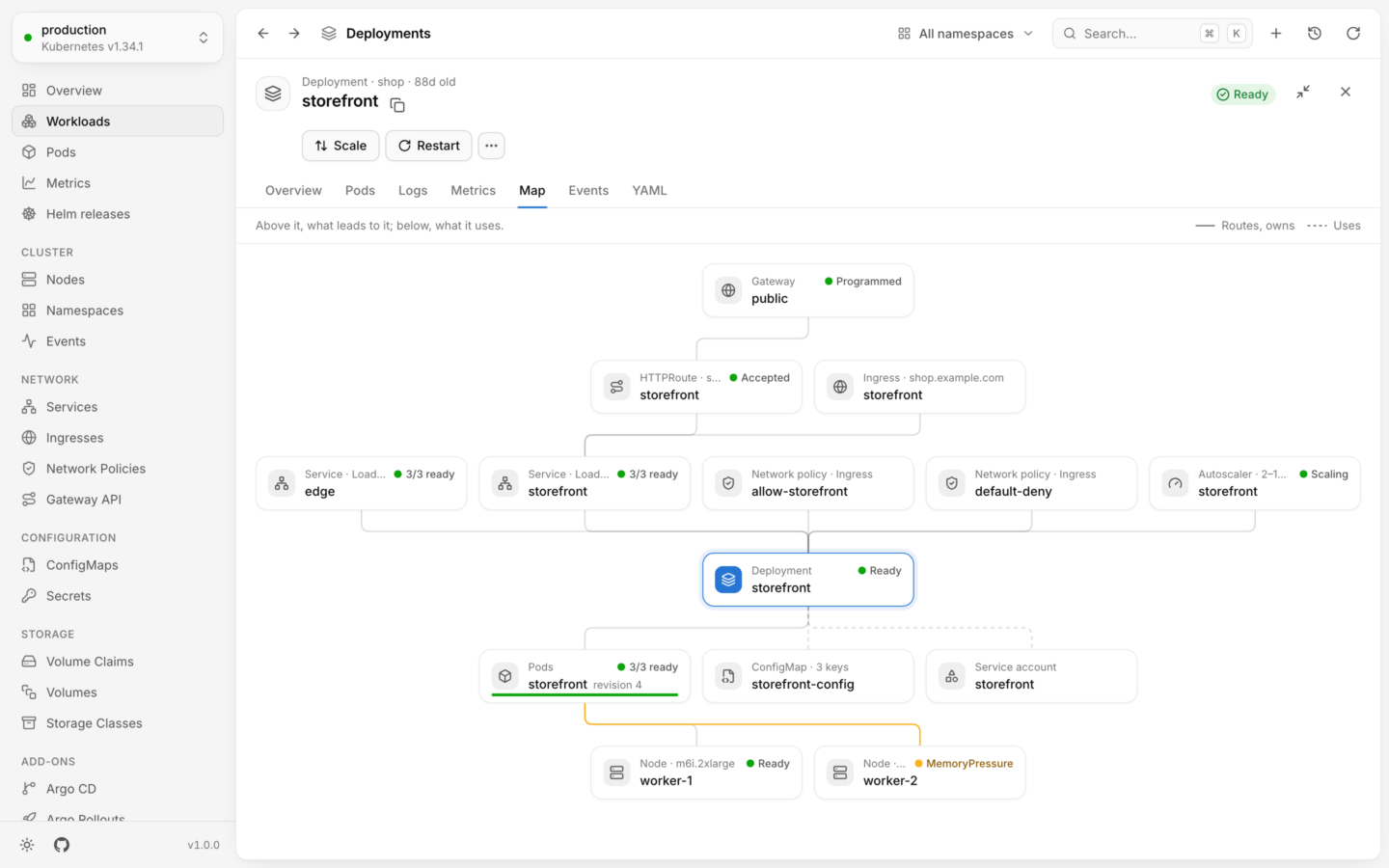
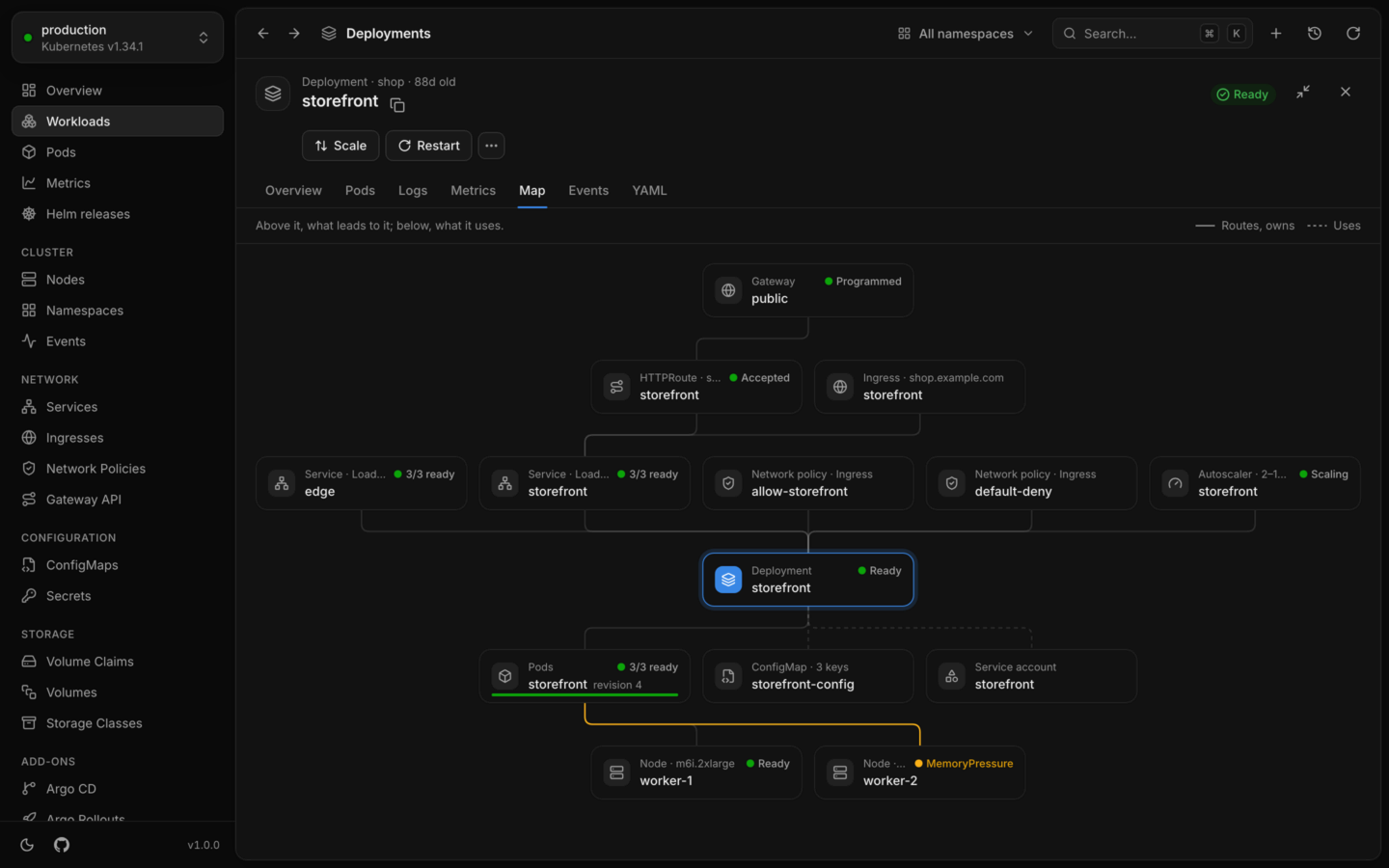
Every object's detail panel has a **Map** tab. It draws how the object is connected to the rest of the cluster. Above the object is what leads to it: the gateway, ingress and service in front of a workload, the autoscaler that scales it, the policies that apply to it. Below it is what it owns, uses and runs on: its pods, the ConfigMaps, Secrets and volumes they use, and the nodes they run on. What's missing or unwell stands out, so you can follow a problem from the traffic to the node in one picture.
 ## Open it
[Open an object](/explore/details), and choose **Map**, just before **Events**. Every kind has one except events and namespaces, which relate to everything in their scope or to nothing.
The map covers the object's own namespace, whatever the namespace menu shows. An object without a namespace, like a node or a volume, is mapped across the whole cluster. For more room, choose **Expand panel** in the panel's header.
## Read the map
The line at the top says how it reads: *Above it, what leads to it; below, what it uses.* The object the map is about has a colored icon and outline.
Cards sit in rows, in the direction things flow: from gateways and ingresses, through services and the workload, to its pods, and on to the nodes they run on and the volumes they mount. Each row is ordered to keep lines from crossing. Lines run like an organization chart's, sharing a lane where several fan out from one card or into one.
The legend on the right tells the two kinds of line apart:
| Line | Means |
| - | - |
| Solid, **Routes, owns** | Traffic and control: routes to, selects, owns, scales, guards, applies to, runs on |
| Dashed, **Uses** | What it uses: ConfigMaps, Secrets, service accounts, volume claims, volumes and storage classes |
A line to something that's failing or warning takes its color, so the way to a problem stands out.
## What a card shows
Each card has the object's kind, its name, and its status as the lists show it, like Ready or MemoryPressure. Some kinds add a word about the object, next to the kind:
| Kind | Also shows |
| - | - |
| Service | Its type and ports, like `ClusterIP · 8080` |
| Ingress, HTTPRoute | Its first host |
| ConfigMap | How many keys it has |
| Secret | **TLS**, **Registry** for an image pull secret, or how many keys it has |
| Volume claim, Volume | Its size |
| Autoscaler | Its replica range, like `2–10 replicas` |
| CronJob | Its schedule |
| Node | Its instance type |
| Storage class | Its provisioner |
| Network policy | Its policy types, like `Ingress, Egress` |
A Service's status is about the pods it selects: 3/3 ready, 1/3 ready when some aren't, 0/2 ready when none are, and No pods when its selector matches nothing.
For screen readers, each card also says what it's connected to, like "Selects Deployment storefront. Ingress storefront: routes to it."
## What it connects
Lumovi reads the connections from the objects themselves:
| From | To | Found in |
| - | - | - |
| Gateway | HTTPRoute | The route's `parentRefs` |
| Ingress, HTTPRoute | Service | Their backends, and an ingress's default backend |
| Ingress | Secret | Its TLS secrets |
| Service | Workloads, and pods without one | Its selector: the workloads whose pods it matches, and a workload scaled to zero by its pod template |
| Autoscaler | Workload | Its scale target |
| Disruption budget, Network policy | Workloads, and pods without one | Their pod selector. A network policy with an empty selector applies to every pod in the namespace. |
| Owner | What it owns | Owner references: a Deployment's pods, a CronJob's Jobs |
| Workload, Pod | ConfigMap, Secret | Volumes, projected volumes, `env`, `envFrom` and image pull secrets, of every container, init containers included |
| Workload, Pod | Service account | Its `serviceAccountName`, unless that's `default` |
| Workload, Pod | Volume claim | Its volumes, and a StatefulSet's claims made from its claim templates |
| Pod | Node | The node it runs on |
| Volume claim | Volume, Storage class | The volume it's bound to, or until then, its storage class |
| Volume | Storage class | Its storage class |
Gateways and HTTPRoutes are on the map when the cluster has Gateway API installed. Two things every pod has are left out, since they'd say nothing: the `default` service account, and the token and CA certificate Kubernetes mounts into every pod.
A Deployment's ReplicaSets don't get cards: its pods hang off the Deployment, the way you think of them. Open a ReplicaSet to see its own map.
## How far it goes
The map follows connections a few steps out from the object: up to three steps up, to what leads to it, and up to five down, to what it uses. That's enough to go from a workload's gateway to the nodes it runs on, and it keeps a map the same size however big the cluster is. A node's map goes two steps up: the pods running on it, and the workloads they belong to. Their services are on the workloads' own maps.
Only what's connected through the object is shown. If a Service selects two Deployments, the map of one doesn't show the other.
## Pods, grouped
A workload's pods are one card, **Pods**, however many replicas it runs. A Deployment gets a card per revision, named after it with its revision, like *storefront revision 4*, so a rollout in progress shows the old pods and the new ones side by side. A CronJob's pods are grouped by Job.
The card says how many are ready, like 3/3 ready, and a bar along its bottom shows each pod's health. Click it to show each pod as a card of its own. **Collapse**, at the top of the map, groups them again.
The pod a map is about always has a card of its own.
## Missing and unknown
When an object refers to something that isn't there, like a ConfigMap that was never created, a Service an ingress routes to, or a node that's gone, the map still shows it, with a dashed red outline and Not found. The line to it is red, so it's hard to miss.
When Lumovi can't list a kind (your account can't read Secrets, say), what refers to one still shows, but without a status, since Lumovi can't tell whether it exists.
When nothing connects to the object and it connects to nothing, the map says **Nothing connected**, and why:
| Kind | Says |
| - | - |
| ConfigMap, Secret | No pod, workload or ingress here refers to it. |
| Volume claim | No pod mounts it. |
| Service | It selects no pods, and nothing routes to it. |
| Anything else | Nothing here refers to this … , and it refers to nothing. |
These are good places to look for leftovers to clean up.
## Rows that don't fit
A row with more cards than the panel fits, like a node's hundreds of pods, ends in a card like **+ 12 more**. What shows first is the object itself, then what's unwell, then what goes by the object's name, like its Service and its autoscaler. Lines to the hidden cards go to that card.
Click it to show the whole row, over as many lines as it takes. **Collapse** shrinks it again. **Expand panel** fits more cards in each row.
## Trace a chain
Point at a card, or move to it with Tab, and the map traces its chain: everything it leads to and everything that leads to it, all the way. Its lines are highlighted and the rest of the map fades. It answers questions like "which ingress reaches these pods?" or "what ends up using this Secret?" at a glance.
## Open another object
Click a card, or press ↵ on it, to open its object in the detail panel, on its own map. From there you can keep following the connections. The object the map is about, and cards that are missing, can't be opened. A **Pods** card shows each pod instead.
## Custom resources
Custom resources have a map too. Lumovi connects them by their owner references, so a custom resource that creates pods or ReplicaSets leads to them, and by what their [view](/custom-resources/overview) relates them to. A Karpenter node pool's map, for example, shows the nodes it launched.
## What it needs
The map is drawn from the lists Lumovi already reads, and refreshes with them while it's open. It lists:
* In the object's namespace: pods, Deployments, ReplicaSets, StatefulSets, DaemonSets, Jobs, CronJobs, autoscalers, Services, Ingresses, network policies, ConfigMaps, Secrets, volume claims, service accounts and PodDisruptionBudgets, and HTTPRoutes and Gateways where Gateway API is installed. For an object without a namespace, like a node, these are listed in every namespace.
* Across the cluster: nodes, volumes and storage classes.
* For a custom resource, the kinds its view relates it to.
None of them is required. What you can't list is left off the map, or shown without a status where something refers to it. Like every list, each kind is read up to 5,000 objects ([`LUMOVI_MAX_LIST_ITEMS`](/reference/environment-variables)). See [Permissions](/clusters/permissions).
The detail panel, and every tab in it.
What each card's status means.
This documentation is built and hosted on [Mintlify](https://mintlify.com), a developer documentation platform.
## Open it
[Open an object](/explore/details), and choose **Map**, just before **Events**. Every kind has one except events and namespaces, which relate to everything in their scope or to nothing.
The map covers the object's own namespace, whatever the namespace menu shows. An object without a namespace, like a node or a volume, is mapped across the whole cluster. For more room, choose **Expand panel** in the panel's header.
## Read the map
The line at the top says how it reads: *Above it, what leads to it; below, what it uses.* The object the map is about has a colored icon and outline.
Cards sit in rows, in the direction things flow: from gateways and ingresses, through services and the workload, to its pods, and on to the nodes they run on and the volumes they mount. Each row is ordered to keep lines from crossing. Lines run like an organization chart's, sharing a lane where several fan out from one card or into one.
The legend on the right tells the two kinds of line apart:
| Line | Means |
| - | - |
| Solid, **Routes, owns** | Traffic and control: routes to, selects, owns, scales, guards, applies to, runs on |
| Dashed, **Uses** | What it uses: ConfigMaps, Secrets, service accounts, volume claims, volumes and storage classes |
A line to something that's failing or warning takes its color, so the way to a problem stands out.
## What a card shows
Each card has the object's kind, its name, and its status as the lists show it, like Ready or MemoryPressure. Some kinds add a word about the object, next to the kind:
| Kind | Also shows |
| - | - |
| Service | Its type and ports, like `ClusterIP · 8080` |
| Ingress, HTTPRoute | Its first host |
| ConfigMap | How many keys it has |
| Secret | **TLS**, **Registry** for an image pull secret, or how many keys it has |
| Volume claim, Volume | Its size |
| Autoscaler | Its replica range, like `2–10 replicas` |
| CronJob | Its schedule |
| Node | Its instance type |
| Storage class | Its provisioner |
| Network policy | Its policy types, like `Ingress, Egress` |
A Service's status is about the pods it selects: 3/3 ready, 1/3 ready when some aren't, 0/2 ready when none are, and No pods when its selector matches nothing.
For screen readers, each card also says what it's connected to, like "Selects Deployment storefront. Ingress storefront: routes to it."
## What it connects
Lumovi reads the connections from the objects themselves:
| From | To | Found in |
| - | - | - |
| Gateway | HTTPRoute | The route's `parentRefs` |
| Ingress, HTTPRoute | Service | Their backends, and an ingress's default backend |
| Ingress | Secret | Its TLS secrets |
| Service | Workloads, and pods without one | Its selector: the workloads whose pods it matches, and a workload scaled to zero by its pod template |
| Autoscaler | Workload | Its scale target |
| Disruption budget, Network policy | Workloads, and pods without one | Their pod selector. A network policy with an empty selector applies to every pod in the namespace. |
| Owner | What it owns | Owner references: a Deployment's pods, a CronJob's Jobs |
| Workload, Pod | ConfigMap, Secret | Volumes, projected volumes, `env`, `envFrom` and image pull secrets, of every container, init containers included |
| Workload, Pod | Service account | Its `serviceAccountName`, unless that's `default` |
| Workload, Pod | Volume claim | Its volumes, and a StatefulSet's claims made from its claim templates |
| Pod | Node | The node it runs on |
| Volume claim | Volume, Storage class | The volume it's bound to, or until then, its storage class |
| Volume | Storage class | Its storage class |
Gateways and HTTPRoutes are on the map when the cluster has Gateway API installed. Two things every pod has are left out, since they'd say nothing: the `default` service account, and the token and CA certificate Kubernetes mounts into every pod.
A Deployment's ReplicaSets don't get cards: its pods hang off the Deployment, the way you think of them. Open a ReplicaSet to see its own map.
## How far it goes
The map follows connections a few steps out from the object: up to three steps up, to what leads to it, and up to five down, to what it uses. That's enough to go from a workload's gateway to the nodes it runs on, and it keeps a map the same size however big the cluster is. A node's map goes two steps up: the pods running on it, and the workloads they belong to. Their services are on the workloads' own maps.
Only what's connected through the object is shown. If a Service selects two Deployments, the map of one doesn't show the other.
## Pods, grouped
A workload's pods are one card, **Pods**, however many replicas it runs. A Deployment gets a card per revision, named after it with its revision, like *storefront revision 4*, so a rollout in progress shows the old pods and the new ones side by side. A CronJob's pods are grouped by Job.
The card says how many are ready, like 3/3 ready, and a bar along its bottom shows each pod's health. Click it to show each pod as a card of its own. **Collapse**, at the top of the map, groups them again.
The pod a map is about always has a card of its own.
## Missing and unknown
When an object refers to something that isn't there, like a ConfigMap that was never created, a Service an ingress routes to, or a node that's gone, the map still shows it, with a dashed red outline and Not found. The line to it is red, so it's hard to miss.
When Lumovi can't list a kind (your account can't read Secrets, say), what refers to one still shows, but without a status, since Lumovi can't tell whether it exists.
When nothing connects to the object and it connects to nothing, the map says **Nothing connected**, and why:
| Kind | Says |
| - | - |
| ConfigMap, Secret | No pod, workload or ingress here refers to it. |
| Volume claim | No pod mounts it. |
| Service | It selects no pods, and nothing routes to it. |
| Anything else | Nothing here refers to this … , and it refers to nothing. |
These are good places to look for leftovers to clean up.
## Rows that don't fit
A row with more cards than the panel fits, like a node's hundreds of pods, ends in a card like **+ 12 more**. What shows first is the object itself, then what's unwell, then what goes by the object's name, like its Service and its autoscaler. Lines to the hidden cards go to that card.
Click it to show the whole row, over as many lines as it takes. **Collapse** shrinks it again. **Expand panel** fits more cards in each row.
## Trace a chain
Point at a card, or move to it with Tab, and the map traces its chain: everything it leads to and everything that leads to it, all the way. Its lines are highlighted and the rest of the map fades. It answers questions like "which ingress reaches these pods?" or "what ends up using this Secret?" at a glance.
## Open another object
Click a card, or press ↵ on it, to open its object in the detail panel, on its own map. From there you can keep following the connections. The object the map is about, and cards that are missing, can't be opened. A **Pods** card shows each pod instead.
## Custom resources
Custom resources have a map too. Lumovi connects them by their owner references, so a custom resource that creates pods or ReplicaSets leads to them, and by what their [view](/custom-resources/overview) relates them to. A Karpenter node pool's map, for example, shows the nodes it launched.
## What it needs
The map is drawn from the lists Lumovi already reads, and refreshes with them while it's open. It lists:
* In the object's namespace: pods, Deployments, ReplicaSets, StatefulSets, DaemonSets, Jobs, CronJobs, autoscalers, Services, Ingresses, network policies, ConfigMaps, Secrets, volume claims, service accounts and PodDisruptionBudgets, and HTTPRoutes and Gateways where Gateway API is installed. For an object without a namespace, like a node, these are listed in every namespace.
* Across the cluster: nodes, volumes and storage classes.
* For a custom resource, the kinds its view relates it to.
None of them is required. What you can't list is left off the map, or shown without a status where something refers to it. Like every list, each kind is read up to 5,000 objects ([`LUMOVI_MAX_LIST_ITEMS`](/reference/environment-variables)). See [Permissions](/clusters/permissions).
The detail panel, and every tab in it.
What each card's status means.
This documentation is built and hosted on [Mintlify](https://mintlify.com), a developer documentation platform.