

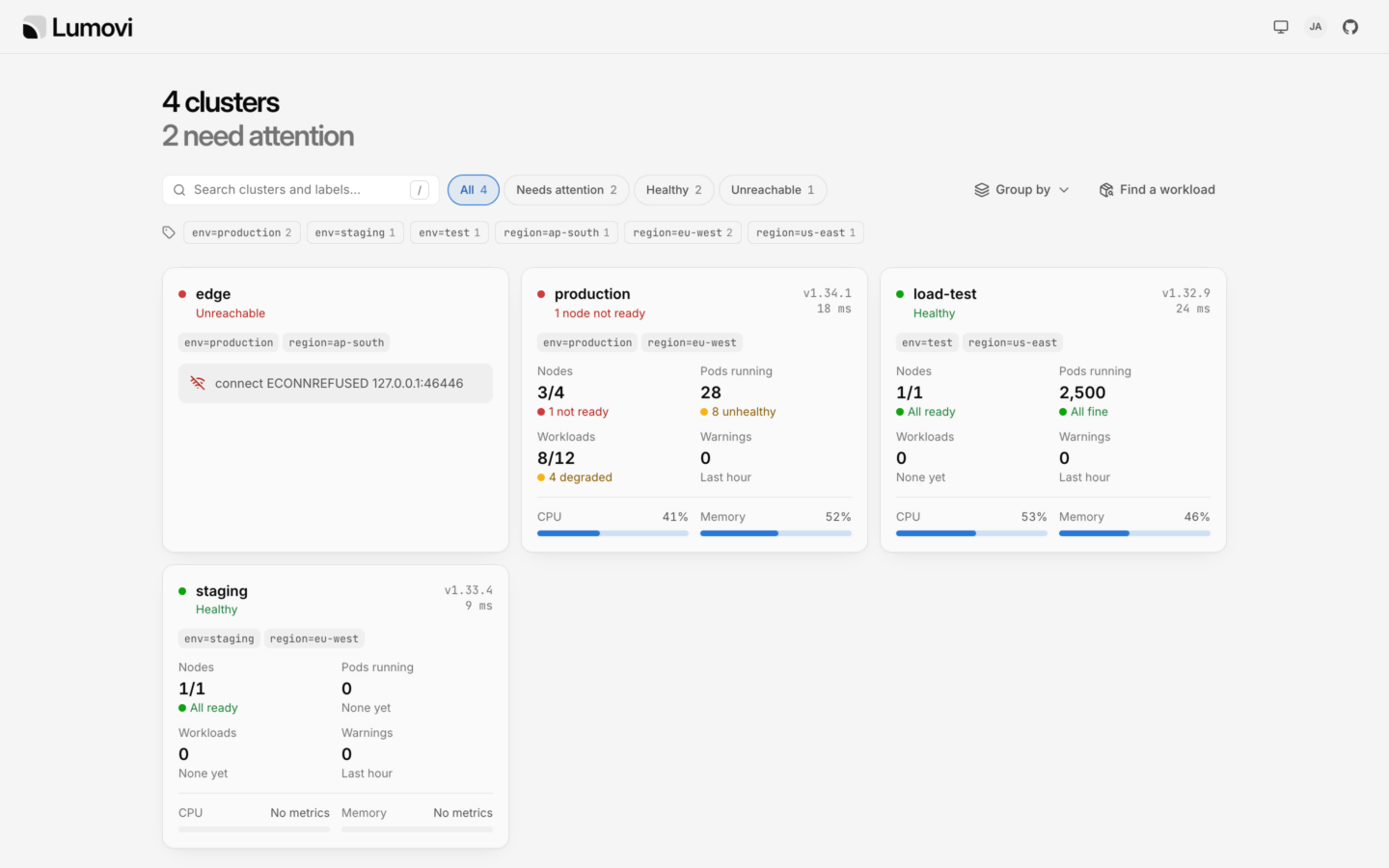

A fleet of four clusters: the ones that need attention first.
Add a cluster
A service account that may only impersonate, and its token.
Private clusters
An agent in the cluster dials Lumovi, when Lumovi can’t reach it.
How it works
Lumovi keeps a list of clusters, with credentials for each that should allow nothing but impersonating people. Every request Lumovi makes to a cluster carries them, withImpersonate-User and Impersonate-Group headers naming whoever is signed in, so each cluster’s API server applies that person’s RBAC. Someone with no role in a cluster sees nothing in it. On clusters that trust your identity provider, requests can carry each person’s own token instead: see Sign-in.
Clusters come from:
- A kubeconfig, each of whose contexts is a cluster: in a setting, or in files Lumovi reads again as they change. See Describe the clusters.
- Secrets of the cluster Lumovi runs in: its own, Cluster API’s and Argo CD’s. See Clusters from Secrets.
- Agents, for clusters Lumovi can’t reach: each dials Lumovi from inside its cluster. See Private clusters.
- The cluster Lumovi runs in, if it runs in one. See The cluster it runs in.
Sign-in
A fleet needs single sign-on or an authenticating proxy. A token says who someone is to one cluster only, so with token sign-in (the default) a fleet doesn’t start:auth.mode: token, for the same reason.
People sign in once, to Lumovi. Their names and groups come from your provider or proxy, and Lumovi uses them in every cluster. LUMOVI_USERNAME_PREFIX and LUMOVI_GROUPS_PREFIX (the chart’s auth.usernamePrefix and auth.groupsPrefix) apply in every cluster too, unless a cluster sets its own. Lumovi never acts as one of Kubernetes’ own users or groups (system:…) in any of them. It leaves out groups whose names, with a cluster’s prefix, would start with system:. Someone whose name would, with the server’s prefix, can’t sign in. With a cluster’s own prefix, that cluster’s card says why it can’t be used.
When some of your API servers trust your provider themselves, Lumovi can pass people’s own tokens on to those: set LUMOVI_OIDC_FORWARD_TOKEN (the chart’s auth.oidc.forwardToken), and forwardToken: true on those clusters. It impersonates people in the others, and always in the cluster it runs in.
- A cluster that refuses someone’s token says Unauthorized on its card. They stay signed in, and the other clusters work: in a fleet, one cluster refusing a token doesn’t end the session, as it does in a Lumovi of one cluster.
- Behind a proxy, Lumovi has no tokens to pass on, so a cluster with
forwardToken: truecan’t be used. Its card says why.
Where it runs
Lumovi doesn’t need to run in Kubernetes to show a fleet. It needs to reach each cluster’s API server, or each cluster’s agent needs to reach it.
Run one Lumovi, with one replica. Sessions live in its memory, and each agent connects to one Lumovi. With single sign-on, restarting it, as an upgrade does, signs everyone out. Its agents connect again by themselves.
Describe the clusters
Give Lumovi a kubeconfig. Each context is a cluster, called by the context’s name: in Lumovi’s pages, their addresses and titles. Its user is how Lumovi signs in there: a token or a client certificate that may impersonate users and groups, and nothing more. Add a cluster makes one, and prints the kubeconfig to add.fleet.yaml
LUMOVI_FLEET_KUBECONFIG: the kubeconfig itself, as YAML or JSON, or that encoded in base64 on one line, for platforms whose settings take one line. Lumovi reads it when it starts, and one that isn’t a kubeconfig stops it. To change it, change the setting and restart Lumovi.LUMOVI_FLEET_KUBECONFIG_FILE: one or more files, separated by:. Lumovi reads them when it starts, and again every 30 seconds (LUMOVI_FLEET_REFRESH_SECONDS), so you can add and remove clusters without restarting it. Relative paths in a file are read from that file’s folder.
Settings for each cluster
Each context can have Lumovi’s settings for its cluster, in an extension calledlumovi.dev. Every one is optional.
object
The cluster’s labels, like
{ env: production, region: eu-west }, each a piece of text (quote numbers: tier: '1'). The fleet page filters and groups clusters by them.string[]
Only people in one of these groups see the cluster, in the fleet page or anywhere else in Lumovi: groups as your provider or proxy names them, without prefixes. Without it, everyone signed in does, and an empty list hides it from everyone. It decides what Lumovi shows, not what people may do: RBAC still decides that.
boolean
default:"false"
true: requests carry each person’s own token, for an API server that trusts your provider, instead of impersonating them. Lumovi must have their tokens: set LUMOVI_OIDC_FORWARD_TOKEN. The context’s user can then have no credentials at all.string
Put before the names of the users Lumovi impersonates here, instead of
LUMOVI_USERNAME_PREFIX. '' puts nothing before them here.string
Put before the names of their groups here, instead of
LUMOVI_GROUPS_PREFIX. Each prefix a cluster doesn’t set is the server’s.fleet.yaml
Its lumovi.dev extension: forwardToken must be true or false. The other clusters work.
Only a kubeconfig’s contexts have this extension, including those in Lumovi’s own Secrets. Secrets give clusters labels, groups and forwardToken in annotations, and agents in Lumovi’s list of them. Clusters from Cluster API’s and Argo CD’s Secrets, agents’ clusters and the cluster Lumovi runs in all take the server’s prefixes.
The cluster it runs in
In a cluster, Lumovi includes that cluster in its fleet, asin-cluster unless LUMOVI_CLUSTER_NAME (the chart’s clusterName) names it, with the labels in LUMOVI_CLUSTER_LABELS (env=production,region=eu-west, the chart’s fleet.labels). Everyone signed in sees it.
It reaches it with its pod’s service account, impersonating people even where it passes tokens on to other clusters, so the service account needs to impersonate users and groups. The chart lets it, unless fleet.includeThisCluster is false.
It’s in the fleet whenever Lumovi runs in a cluster, unless LUMOVI_FLEET_LOCAL=false leaves it out. LUMOVI_FLEET_LOCAL=true on its own makes a fleet of just that cluster, and outside a cluster stops Lumovi.
With Helm
Put the kubeconfig in a Secret, underkubeconfig, in Lumovi’s namespace:
values.yaml
kubeconfig at /etc/lumovi/fleet/kubeconfig, so the pod doesn’t start until the Secret is there, with that key. Kubernetes updates the mounted file when the Secret changes, and Lumovi reads it again, so a cluster you add appears within a minute or two. The chart’s notes, after installing, start with Lumovi shows a fleet of clusters to whoever signs in, hub among them. Every fleet value is in Helm values.
With Docker
Keep the kubeconfig in a folder, and mount the folder (a file mounted on its own isn’t updated when an editor replaces it):LUMOVI_URL to the address people open. See Run it without Kubernetes.
The fleet page
Lumovi’s home page is the fleet: every cluster the person signed in may see, as a card that sums it up the way its overview does. What people see on it, and how they move between clusters, is in Clusters in a fleet. For whoever runs Lumovi:- Each cluster is asked as the person, every 30 seconds while the page is open. A count they may not list says No access, and a cluster where they may list none of its nodes, pods and workloads isn’t said to be healthy.
- Filters: the chips are All, Needs attention, Healthy and Unreachable (clusters that didn’t answer, or can’t be used), and a chip with no clusters is hidden. Clusters still being checked, and those the person has no access to, are only under All. People also pick labels, search by name or label (/ or ⌘K goes to the search; ⌘ is Ctrl on Windows and Linux) and group the cards by a label’s values. All of these are in the page’s address, so a link keeps them.
- Find a workload searches the Deployments, StatefulSets, DaemonSets and CronJobs of every cluster that answered, by name or namespace, and lists the first 50: move to one with ↑ ↓ and press ↵ to open it in its cluster. It lists each kind in the whole cluster, as the person, so it finds nothing in a cluster where they may only list workloads in some namespaces.
- Someone who may see none of the clusters gets No clusters for you here, and is asked to have whoever runs Lumovi add one, or share one with their groups.
Until a cluster answers, its card says Checking…. The cards that need attention come first, critical before warning, then those still being checked, the healthy ones, and last those the person has no access to, each in order of name. Warning events are counted on each card, but don’t make a cluster need attention: every cluster has some.


Finding a workload in every cluster.
- Read-only: each person can make a cluster read-only for themselves, in their browser.
readOnly: true(LUMOVI_READ_ONLY) makes every cluster read-only for everyone. - Usage history comes from
metrics.source(LUMOVI_METRICS_SOURCE) in every cluster, unless people choose another source for one. In a fleet, leave itauto, so Lumovi looks in each cluster, unless they all have the same service. - Views and add-ons everyone sees are the server’s, for every cluster: see Views for everyone.
When a cluster can’t be used
Its card says why, and so does opening it. These are about Lumovi’s settings rather than the cluster:
A Secret that doesn’t describe a cluster as it should is shown under the Secret’s name, as Misconfigured: see Clusters from Secrets. Anything else is the cluster’s own answer, as it would be on the desktop: Unreachable, Timed out, Certificate error, Unauthorized and the rest. See Troubleshooting.
A cluster someone can’t see, because of its
groups, isn’t there for them: its address says This server has no cluster called "staging" that you can see.
Lumovi’s log says when clusters come and go (Fleet: staging added, Fleet: staging removed; when it starts, every cluster is added), and says each problem with a source once, until it changes. Two clusters can’t have the same name: the first one stays, and the log says which was left out:
LUMOVI_FLEET_KUBECONFIG comes first, then the cluster Lumovi runs in, the files in LUMOVI_FLEET_KUBECONFIG_FILE, Secrets, and agents last.
Helm
Helm runs on Lumovi’s machine, with the helm in Lumovi’s image, once for each change. Each run gets a kubeconfig of its own for the cluster it changes, acting as the person who made it there: impersonating them with Lumovi’s credentials for that cluster, or with their own token where the cluster takes it. For a cluster behind an agent, Lumovi opens a port on127.0.0.1 that leads through the agent while helm runs, and closes it after.
Security
A fleet’s Lumovi holds credentials that may impersonate anyone in every cluster it shows. Whoever controls it, or reads its kubeconfig, controls them all. Treat it like the most trusted of your clusters:- Give it credentials that may only impersonate. Add a cluster makes a service account that may do nothing else, so Lumovi acts only as the people who sign in.
- Keep its kubeconfig secret, in a Secret or a setting only its administrators can read, and its agents’ tokens in their own clusters.
- Use prefixes, so no name or group from your provider or proxy is one of a cluster’s own by accident.
- Behind a proxy, let nothing else reach Lumovi. It trusts the proxy’s headers completely.
Add a cluster
Its service account, its token, and the kubeconfig to add.
On Sevalla
A fleet without Kubernetes, from environment variables.