

kubectl may still only look at them through Lumovi, or open shells only in staging, or see Secrets’ keys but not their values. The server decides, whatever a page shows, and every refusal says why.
It’s for Lumovi in your cluster, or a fleet. The desktop app has none: it does what your kubeconfig allows.
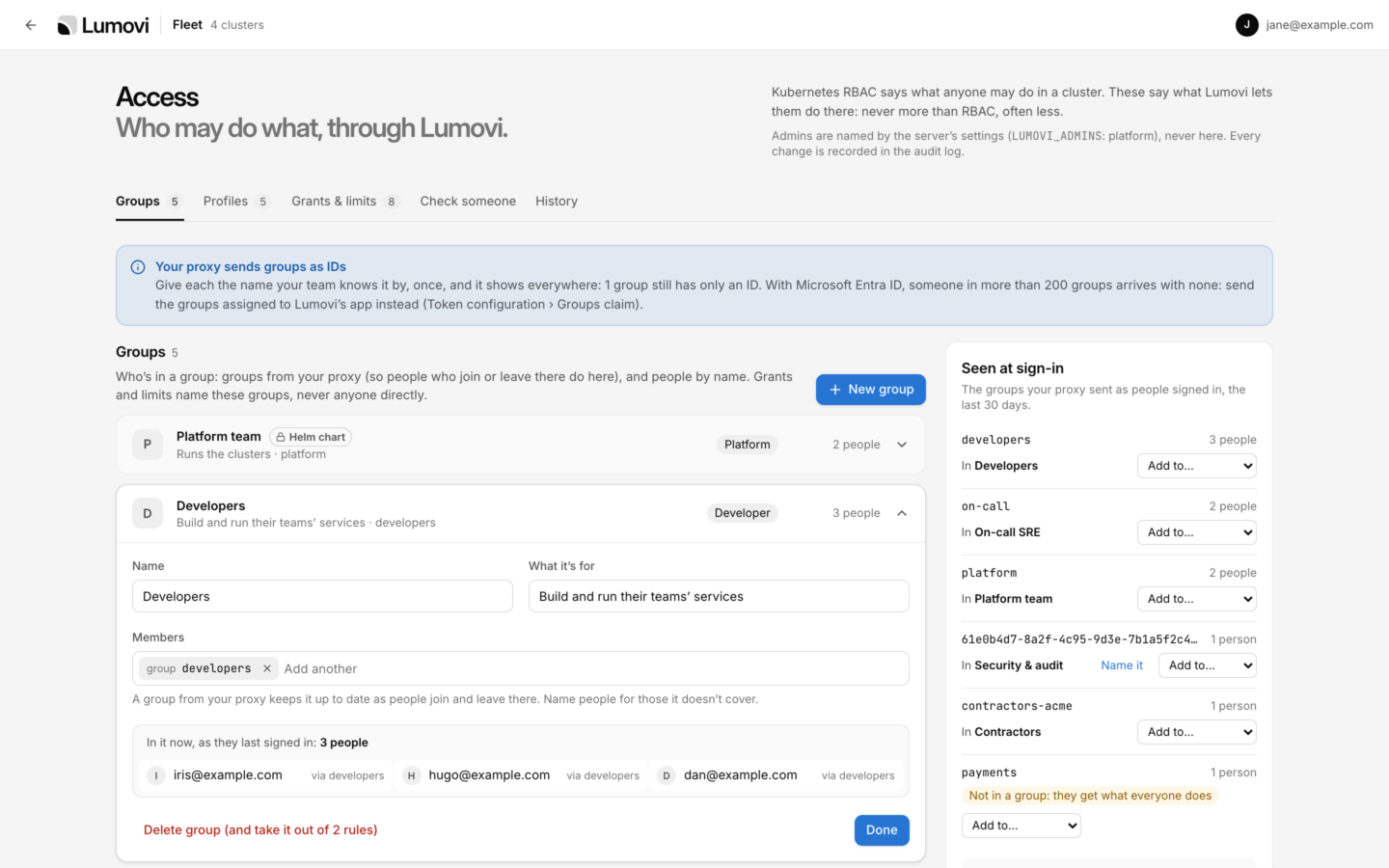

Access, for Lumovi's admins: groups, and the provider's groups seen at sign-in.
How it works
Five pieces decide what someone may do:- Everyone: what everyone signed in gets, wherever nothing gives more.
- Groups: Lumovi’s own. Their members are your identity provider’s groups, so people who join or leave there do here, and people by name. They decide what Lumovi lets people do, and nothing else: they never reach the cluster, and Lumovi acts as people with their own name and groups, as it always does.
- Profiles: a level of each thing Lumovi lets people do, as a set: Developer, Operator, Auditor.
- Grants: give groups a profile, in some clusters and namespaces. Someone in several groups gets the most any of their grants gives there, setting by setting.
- Limits: hold back the groups they name, wherever they match, whatever grants give. A limit that names no group holds back everyone, admins included.
What it decides
Each has levels, from the least to the most:
In settings, the levels are
read, write; off, on; hidden, keys, values; off, upgrade, install; off, ask, self; and own, all.
Where a grant or limit applies
Each says where, as AI assistants’ rules do.clusters and namespaces each take names, patterns like tenant-*, labels like team=payments, and ! first to leave some out, like !kube-*. None means all of them. A cluster’s labels are clusterLabels, or in a fleet, its clusters’ own.
- A Namespace object counts as being in itself: a grant for
shoplets someone change theshopNamespace too. - A cluster’s own objects, like nodes, persistent volumes and cluster roles, follow only grants and limits that name no namespaces. So do node shells, decided for a cluster’s nodes. See A cluster’s own objects.
- Where a namespace’s labels can’t be read, a grant that needs them doesn’t apply, and a limit that might does: what’s decided is never more than what’s so.
A cluster’s own objects
A grant or limit that names namespaces is about what’s in them, and leaves a cluster’s own objects alone: nodes, persistent volumes, storage classes, cluster roles, CustomResourceDefinitions. A limit onprod-* that makes changes read-only there doesn’t stop anyone cordoning a node. Only grants and limits that name no namespaces decide a cluster’s own objects, and those reach every namespace too:
values.yaml
Turn it on
Name Lumovi’s admins: groups, exactly as people sign in with them, and people asuser: and their name, whatever its case.
values.yaml
Set it in the chart
Whataccess.policy says applies as Lumovi starts, and admins can’t change it on the page: it shows there with Helm chart, and changes with the chart. It’s the place for what shouldn’t depend on anyone’s clicks, like the platform team’s access, or a limit on production. Admins add the rest on the page.
values.yaml
everyonegives every setting a level, and so does each profile’svalues.onandoffcan be written unquoted: Helm reads them astrueandfalse, and Lumovi takes them as meant. A limit’scapsnames only what it holds back, and never the most there is: that would limit nothing.- Ids are lowercase letters, digits and
-. Grants and limits name groups and profiles by their ids. namesgives provider groups a name to show, for providers that send IDs:{ 61e0b4d7-8a2f-4c95-9d3e-7b1a5f2c4e80: Security }.- Without
everyone, what everyone gets is the admins’ to say on the page: everything, until they say less.
LUMOVI_ACCESS. The chart’s schema checks its shape: each level and id. Lumovi checks the rest as it starts, like what a grant names, and one that doesn’t make sense stops it, saying where, like:
access.policy still applies, and nobody can change it but the chart.
The Access pages
Admins open them from the shield (Admin: who may do what) at the bottom of the sidebar, or at the top of a fleet’s page of clusters; Admin in the account menu; or Access in the command palette. The address is/access. Anyone else who opens it reads Only Lumovi’s admins see this, and who they are.
Changes made on the tabs are a draft until you save them, together. See Saving.
Groups
Each group, with its members: groups from your identity provider, and people by name. Type to add one: the provider’s groups seen lately and people who signed in are offered, or what you typed, as a group or a person not seen yet. A member nobody who signed in lately matches is marked not seen yet: a typo, maybe, or someone who hasn’t signed in. People match whatever the case of their name; the provider’s groups match exactly. A card shows the profiles its grants give, Limited when a limit names it, and how many people are in it now. Opened, it lists them, In it now, as they last signed in. Seen at sign-in, at the side, lists the groups your provider sent as people signed in, in the last 30 days, with how many people each, and which of Lumovi’s groups it’s in. Add to… adds it to one. One in no group says Not in a group: they get what everyone does.- IDs: Microsoft Entra ID sends groups as IDs. Name it gives one the name your team knows it by, once, and it shows everywhere. Someone in more than 200 Entra groups arrives with none: send the groups assigned to Lumovi’s app instead.
- No groups: when your provider sends none, a note says how to send them: a groups claim in the ID token (
auth.oidc.groupsClaim,groupsunless set), or the proxy’s groups header (auth.proxy.groupsHeader). Until then, only people named in a group are in it. - Who’s seen: each person as their page last connected, with the groups they signed in with. As it starts, Lumovi finds who signed in, or did something through the page, in its audit history: the latest 1,000 such events, in the last 30 days. Each replica keeps its own list.
Profiles


Profiles side by side: what each adds to what everyone gets, with what shows Secret values or runs code on nodes marked.
Grants & limits
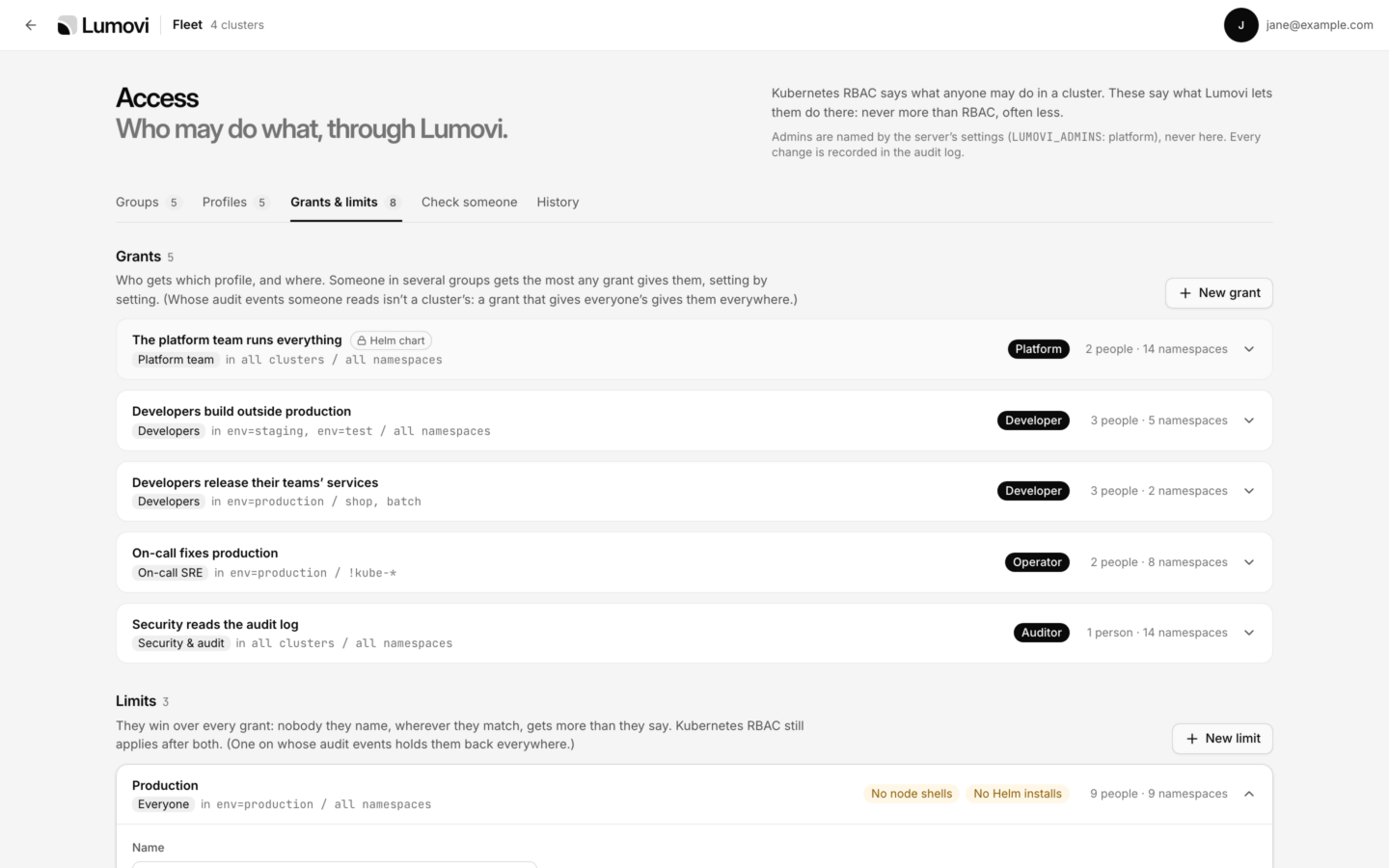
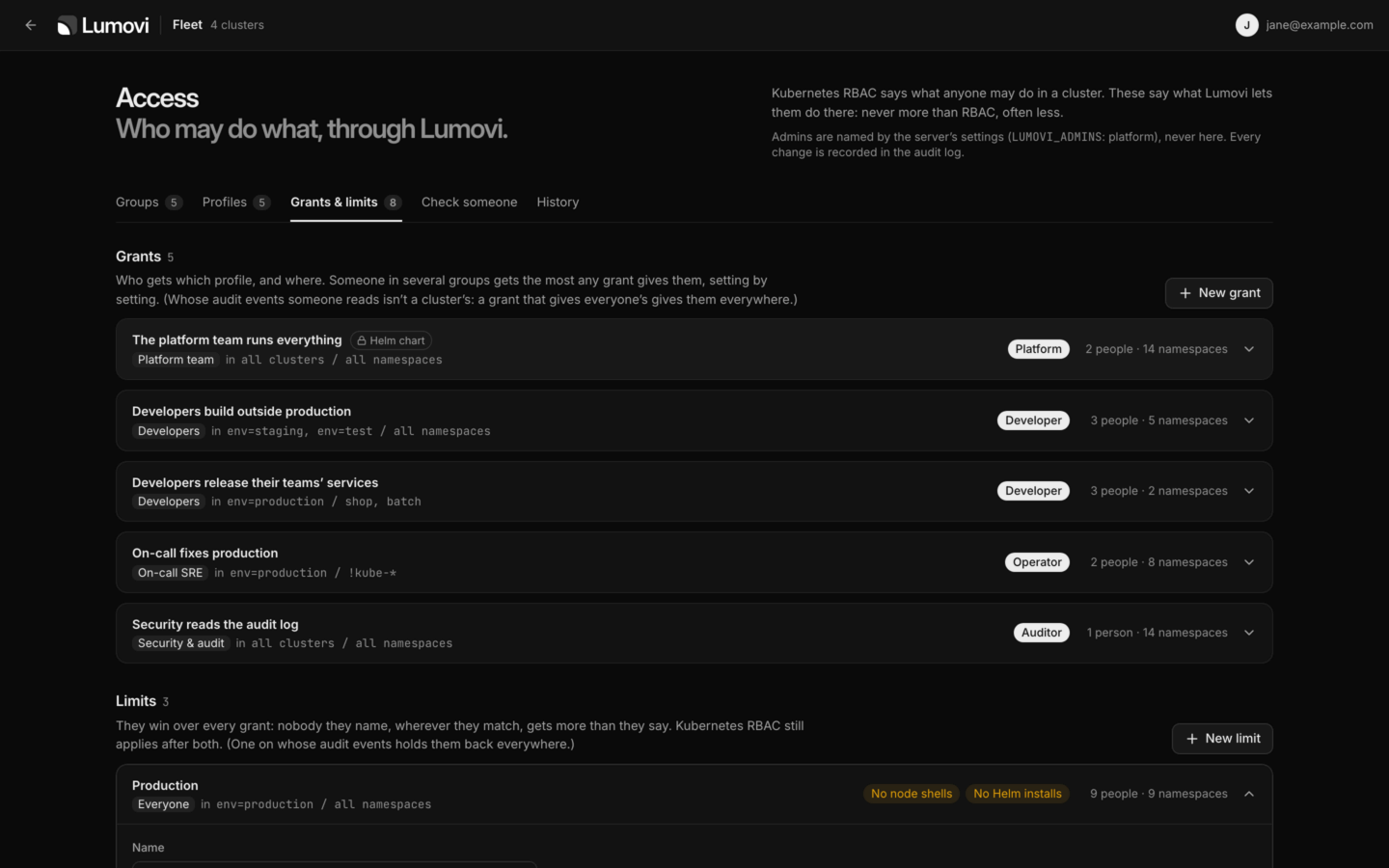
Grants and limits, each with who it names and how far it reaches.
- A grant: a name, Who (Lumovi’s groups), Clusters and Namespaces, and the profile it Gives them, with what that adds to what everyone gets. Make a profile first: a grant gives one.
- A limit: a name, Who it holds back (empty: everyone, admins included), Clusters and Namespaces, and for each setting, Not limited or the most it lets through. They’re the place for production, or namespaces with card data.
Check someone


What someone may do in a namespace, and which grant or limit says so.
audit.auditors (LUMOVI_AUDITORS) names, Audit log says Everyone’s, because of Server: “LUMOVI_AUDITORS names them”. It counts what’s yours unsaved too, so a change can be tried before it’s saved. Their RBAC still applies after it.
History
Every saved change to access, newest first: who made it, from where, and each change as it was and as it is, like HelmSaving
Changes on any tab go into a draft. At the bottom, “3 changes not saved”, with Read them to read each before you save, Discard, and Save changes. Saved, they apply at once, everywhere, and the audit log records them.- Someone else saved first? Lumovi refuses yours, rather than undo theirs: Someone else saved changes to access since you started. Start over from theirs, and make yours again.
- Leaving with changes unsaved asks first: Leave without saving?
- Locked: what the chart sets shows Helm chart, and can’t be changed here.
What Lumovi refuses
Lumovi’s server checks before it acts, as the person: changes, shells, logs, Secrets, Helm and AI assistants. A refusal is anot-allowed error that says what, where and why, like:
Port forwarding isn’t among them: Lumovi in a cluster forwards no ports.
AI assistants
An assistant acting as someone never does more than they may themselves:- Who may use them nowhere can’t allow one. The page for allowing it says “Lumovi’s admins don’t let you use AI assistants on this server. Your access, in Lumovi’s account menu, says more.” An assistant already allowed is refused from then on.
- Off in a namespace hides it from their assistants. A cluster whose own objects are off for them, but some of its namespaces on, is still there, and its own objects are read-only to them.
- Changes ask first makes every change of theirs ask, whatever their AI permissions say. Read-only changes, never.
- Secrets and logs go no further than their own: keys only where they see keys only.
- What’s refused says why: “Lumovi’s admins don’t let the person”, with the grant or limit that decided.
list_clusterstells assistants that Lumovi’s admins decide, namespace by namespace.
Where it’s kept
What admins set is kept in the first of these Lumovi has:-
A ConfigMap, in the namespace Lumovi runs in, named by
LUMOVI_ACCESS_CONFIGMAP, underaccess.json. Withaccess.admins, the chart makes it,<release>-access, and a Role that grants Lumovigetandpatchon it alone. Lumovi reads it, and writes its data alone with a merge patch, so what the chart set on it stays. Upgrades leave what’s in it, and uninstalling keeps it (helm.sh/resource-policy: keep). Withrbac.create: false, grant Lumovi’s service accountgetandpatchon it yourself. Withoutget, Lumovi doesn’t start, and its log says why, likeLumovi can’t read ConfigMap lumovi/lumovi-access, where it keeps access settings: configmaps "lumovi-access" is forbidden: …Withoutpatch, admins’ changes aren’t saved: “Not saved: Lumovi couldn’t keep who may do what: …” -
A file,
access.jsoninLUMOVI_DATA_DIR, written whole, by one Lumovi at a time: a replica takesaccess.json.lockas it writes, and a save while another holds it is refused, as one after someone else’s is. A lock left more than 30 seconds, by a Lumovi that stopped as it wrote, is taken away. -
Memory, until Lumovi stops. Its log says
Access settings are kept in memory: they’re lost when Lumovi stops. Set LUMOVI_DATA_DIR, or install the Helm chart, to keep them., and so do the Access pages.
- Read again every 15 seconds, from the ConfigMap or the file, so every replica follows a change. A change saved against a version someone else has replaced since is refused.
-
Changed by hand, it’s recorded. Lumovi seals what it writes, with a SHA-256 of it kept next to it (
seal). Whenever what’s kept is changed without a seal that matches, it’s recorded in the audit log as access.changed, by Lumovi itself, with"outside": truein its details:- While Lumovi runs, as it reads again: with what changed, its summary starting
Changed outside Lumovi:. - While it was stopped, as it next starts, without what it was before:
Changed outside Lumovi, while it wasn’t running: what it was before can’t be known, and the changeChanged while Lumovi wasn’t running, from what it can’t say: it now has 2 groups, 1 profile, 3 grants and no limits.
Access: Lumovi recorded a change made outside it, and can’t seal it, so it’s recorded again as Lumovi starts: …. History shows these as Outside Lumovi, where it’s kept. A seal isn’t a key: it tells a hand edit from Lumovi’s own, not from someone who works the seal out too. - While Lumovi runs, as it reads again: with what changed, its summary starting
-
Checked as Lumovi starts: what’s kept that doesn’t make sense stops it, rather than let anyone do more. When the chart takes away a group or profile something kept names, the grants and limits left for nobody, or for a profile there isn’t, are dropped, and the log names them, once for each set of them:
Access: the grant “…” named groups or profiles the chart no longer has, and no longer apply.What’s kept isn’t written back: they’re left out as it’s read. - Up to 1 MB.
- Whoever may change that ConfigMap, or the file, is an admin in all but name: they can change who may do what, as admins do, and a change they seal themselves isn’t recorded at all. Keep Lumovi’s namespace, and its data folder, to administrators.
The settings
See Helm values and Configuration.
Troubleshooting
Lumovi doesn't start
Lumovi doesn't start
Its log says what’s wrong with
LUMOVI_ACCESS, or with what was kept, and where: LUMOVI_ACCESS: everyone doesn’t say shells., LUMOVI_ACCESS: everyone.changes is read, write, not “maybe”. Two more stop it:- LUMOVI_ACCESS_CONFIGMAP keeps who may do what in the cluster Lumovi runs in, and it isn’t running in one (KUBERNETES_SERVICE_HOST isn’t set).
- Lumovi can’t read ConfigMap lumovi/lumovi-access, where it keeps access settings: …, when the ConfigMap isn’t there, or Lumovi may not read it.
Nobody is in a group
Nobody is in a group
Your provider sends no groups, and a note on the Groups tab says how to send them. Name people in the group meanwhile. With Microsoft Entra ID, people in more than 200 groups arrive with none.
Someone can't do what they should
Someone can't do what they should
Check someone says which grant or limit decides, in the namespace they tried. If it says they may, their RBAC is what says no: Lumovi never lets anyone do more than that.
Your access
What each person sees of theirs.
Security
What Lumovi is trusted with, and how to contain it.