

- Its place in the sidebar gives the tool an entry. It leads to everything of the tool’s kinds in one list, what’s failing first, with a tab for each kind. See Plugins.
- Its views give each of its kinds the columns people look at first, a status that understands the tool, links to the objects it points to, tabs for the objects that belong to it, and the changes its own CLI offers, as actions.
patch on the kind (or on its status), or create on the kind an action creates. They show the equivalent command, kubectl patch or kubectl create, and are refused in a read-only cluster. In the tables:
- An action whose name ends in … asks first.
- undo: it can be taken back from its notification.
- asks: it asks for a value, like which instance becomes the primary.
- creates: it creates an object, shown as YAML before it’s created.
Where they come from
The included plugins live in their own repository, Lumovi-plugins. Every change there is checked by Lumovi’s own checker against its tool’s CRDs, and they’re released together, as one bundle: built, signed and attested by the repository’s release workflow, from the commit onmain that the release’s tag points at.
Each Lumovi release is built with one of those releases, which it pins by its SHA-256 and names in its release notes. As Lumovi is built, the bundle is checked again: its SHA-256 and its index’s, its signature by Lumovi-plugins’ release workflow on main, its attestation that it was built from the commit the tag points at, and each plugin’s file against the index. If any of it doesn’t hold, Lumovi isn’t built. Lumovi pins only releases that can’t be changed once published. So the plugins in a Lumovi release are the bundle it names, and nothing can be swapped in or added once it’s out.
To check a release of the plugins yourself, with the GitHub CLI (<version> is the one your Lumovi’s release notes name):
Argo CD and Argo Rollouts
Argo CD applications, and Argo Rollouts. They’re two plugins:- Argo CD, under Plugins (
argo-cd): Application, ApplicationSet, AppProject. - Argo Rollouts, under Plugins (
argo-rollouts): Rollout, AnalysisRun, AnalysisTemplate, ClusterAnalysisTemplate, Experiment.
- Sync… asks first, then has Argo CD bring the application in line with its source: at a Revision you give (empty: the one it tracks), with Prune and a Strategy. Pruning is drawn in red and named on the button, Sync and prune. It sends the application’s own sync options too, as Argo CD’s own sync does, so
CreateNamespace=trueand the rest hold; where they includeReplace=trueorForce=true, that’s drawn in red too. While a sync runs, Sync stays where it was, busy, and says how long it has run. - Terminate sync…, while a sync runs or waits to start, asks first, then stops it as Argo CD’s own Terminate does, or takes back one Argo CD hasn’t started. Lumovi reads the application again as it’s sent: if the sync you saw has started, ended or been replaced since, nothing is sent.
- Refresh asks Argo CD to compare the application with its source again.
- Sync… and Refresh are also offered for the applications you select on the plugin’s Applications page, asked once for all, without a revision: each syncs to the one it tracks. Lumovi follows each sync to how it ended.
- An application’s Namespace link opens the namespace it deploys to; its details say its cluster too.
- Promote moves a paused rollout past its pause. Resume unpauses one that was paused by hand.
- Restart… replaces the rollout’s pods a few at a time, as its strategy says. It asks first.
- Abort… stops a rollout in progress and sends traffic back to the stable version. It’s destructive, so it asks first.


Argo CD’s overview: what’s synced and healthy, and what needs attention.
- Overview, its first tab: four tiles (healthy, synced, syncing now, last sync failed), then what wants a look, worst first; the syncs running now, where each is and what it waits on; health and sync broken down; the syncs that ended last; projects and where the applications run; and ApplicationSets, with what each makes its applications from. Its tiles and counts open the Applications page, filtered to what they count.
- Applications, which is also the tab Lumovi shows for the Application kind: every application in one table, searched by name and filtered by health, sync, operation, project, cluster, namespace and auto-sync in Lumovi’s own bar, the plugin told nothing of what’s typed or set there. Its rows can be selected, for Sync… and Refresh.
- Argo CD, a tab on each Application: its health and, beside it, what’s happening to it; while a sync runs, where it is, hook phase by phase and wave by wave, and what it waits on, a hook by its name; its revision, last sync (the last one that finished) and auto-sync; its resources as a graph, those out of sync marked; its sync’s result, resource by resource; its problems in one place; and its history. Where it deploys to the cluster Lumovi is connected to, the graph goes down to its Deployments’ ReplicaSets and their Pods, each card opens what it is, and its problems include the warning events of those that aren’t well. A resource’s row opens Lumovi’s own list of its kind at that one object, for Deployments, StatefulSets, DaemonSets, Services, ConfigMaps, Ingresses, Jobs and CronJobs: the list is Lumovi’s, and the plugin reads nothing of it.
- On that tab, changes it proposes, each confirmed in Lumovi’s own dialog: Sync…, with every option Argo CD’s own sync has (a revision; prune, dry run, apply only and force; its sync options; retry; and only some resources); Refresh (normal or hard); Delete…, saying what happens to what it deployed; auto-sync turned on (prune and self-heal asked first) or off; and Roll back… to an entry of its history, as Argo CD’s own Rollback does, off while auto-sync is on, a sync runs, or it’s being deleted. What does harm, as its file says (prune, force, replace, and syncing only some resources), is drawn in red and named on the button; a dry run changes nothing, and its button says Dry run.
Argo Workflows
Argo Workflows: workflows, their templates and schedules. Argo Workflows, under Plugins (argo-workflows): Workflow, CronWorkflow, WorkflowTemplate, ClusterWorkflowTemplate.
A workflow is Succeeded, Suspended, Stopping, critical when it failed or hit an error, and otherwise in progress with its phase. A cron workflow is Scheduled, Suspended, Stopped, or Can’t submit when it couldn’t start a run.
- Suspend pauses a running workflow, and Resume picks it up again.
- Stop… stops the steps running now, and its exit handlers still run. Terminate… stops everything at once, exit handlers included; it’s destructive. Both are offered while a workflow is pending or running.
- Resubmit… creates a new workflow with a finished one’s spec.
- Submit now… creates a workflow from a cron workflow’s spec, without waiting for its schedule. Submit… creates one that runs a template.
- Runs lists the workflows a cron workflow or a template started.
cert-manager
cert-manager: certificates, their requests, and issuers. cert-manager, under Plugins (cert-manager): Certificate, CertificateRequest, Issuer, ClusterIssuer, Order, Challenge. Orders and challenges have no view.
A certificate is Ready, Issuing, or critical with cert-manager’s reason. A request is Issued, Pending, Denied, or critical with the reason. Issuers are Ready, or critical with the reason.
A certificate’s details add when it’s valid from, when it expires and renews, its lifetime and failed attempts. Expires reads like “in 30d”, and sorts by time.
Cilium
Cilium: network policies, endpoints and nodes of the cluster’s network. Cilium, under Network (cilium): CiliumNetworkPolicy, CiliumClusterwideNetworkPolicy, CiliumEndpoint, CiliumNode, CiliumLoadBalancerIPPool, CiliumEgressGatewayPolicy.
Policies are Valid or Invalid. An endpoint, one for each pod Cilium manages, is Ready, critical when it’s not ready, disconnected or invalid, and otherwise in progress with its state. A load balancer IP pool is Ready, Conflicts when it overlaps another, or Disabled.
CloudNativePG
CloudNativePG: PostgreSQL clusters and their backups. CloudNativePG, under Plugins (cloudnative-pg): Cluster, Pooler, Backup, ScheduledBackup, Database. Poolers and databases have no view.
A cluster is Healthy, critical with its phase when that speaks of a failure or an error, and otherwise in progress with its phase. A backup is Completed, Failed, or in progress with its phase.
- Instances lists the cluster’s instance pods, with their logs and usage. Volumes lists its volume claims.
- Back up now… asks for the Method,
barmanObjectStoreorvolumeSnapshot, and creates a Backup of the cluster. - Switch over… asks which instance is the New primary. The current primary becomes a replica, and connections to the primary drop for a moment. It’s offered when the cluster has two instances or more, and patches the cluster’s status, so it needs
patchon itsstatus. - Restart… restarts the instances one at a time, replicas first and the primary last, with a switchover. It asks first.
- Backups lists the backups a scheduled backup made.
- Overview: every PostgreSQL cluster, what’s failing first, and the one you pick, with its status and why, how many instances are ready, its primary, its last backup, and its PostgreSQL version; then its instances with their role, status, node and restarts, its backups, latest first, its schedules, said in words, and its poolers. A backup’s row opens it in Lumovi, and an instance’s row opens that pod at its Logs tab. Under them is the primary’s log, which Lumovi reads and draws: the plugin’s code never holds a line of it.
- Backup health: how many backups ran in the last day and how many failed, which clusters have had no backup in a day, and the next one scheduled; then every cluster’s backups, latest first, a cluster with a failed or missing backup above the rest.
- Shell into primary and Forward 5432, beside it, link to Lumovi’s own places for the primary’s pod: its Shell tab, and Port forward at PostgreSQL’s port. A link only says where to go: a shell or a forward still starts only when you start it there.
- Back up now… on the cluster you pick is a change it proposes: a Backup of that cluster, by the method you pick where it has more than one, which you confirm in Lumovi’s own dialog. It can’t be pressed while a backup of the cluster runs, or where the cluster has no backup method. Where Lumovi can’t read its backups, it says “Couldn’t read its backups, so one may be running.”
cnpg.io/cluster): their names, namespaces, labels, ages, nodes, conditions and restarts. Wherever they don’t run, the view’s Back up now…, Switch over… and Restart… stay on Lumovi’s list of clusters.
Cluster API
Cluster API: the clusters this one manages, and their machines. Cluster API, under Plugins (cluster-api): Cluster, MachineDeployment, KubeadmControlPlane, Machine, MachineSet, MachinePool, MachineHealthCheck, ClusterClass.
Statuses read both API versions, where v1beta2 says Available and v1beta1 says Ready. A cluster is Available, Not available, Paused, Failed, or in progress with its phase. Machine deployments, sets and pools are Available, Not available, Failed, or in progress. A control plane is Available, Not available or Initializing. A machine is Running, Failed, or in progress with its phase. A health check that may not remediate any more machines is Not remediating.
Pause… stops Cluster API reconciling the cluster, its machines included, until it’s resumed. It asks first. Resume turns reconciling back on.
Crossplane
Crossplane: the packages that extend it. Crossplane, under Plugins (crossplane): Provider, Configuration, Function, CompositeResourceDefinition, Composition. Composite resource definitions and compositions have no view.
A package is Healthy, Installing, or critical with the reason it isn’t installed or healthy.
Elastic
Elastic Cloud on Kubernetes: Elasticsearch, Kibana and the rest of the Elastic Stack. Elastic, under Plugins (eck): Elasticsearch, Kibana, Agent, Beat, ApmServer, Logstash, ElasticMapsServer.
Each reports its health as a color: Green, Yellow or Red (Kibana has no yellow), and is in progress until it does. Elasticsearch can also be Invalid.
External Secrets
External Secrets: secrets kept in sync with a vault or a cloud’s secret store. External Secrets, under Plugins (external-secrets): ExternalSecret, ClusterExternalSecret, SecretStore, ClusterSecretStore, PushSecret. Cluster external secrets and push secrets have no view.
An external secret is Synced, or critical with the reason. A store is Valid, or critical with the reason.
Sync now asks the operator to fetch the secret again right away.
Flux
Flux: what it applies, and where it fetches it from. Flux, under Plugins (flux): Kustomization, HelmRelease, GitRepository, OCIRepository, HelmRepository, HelmChart, Bucket.
Statuses follow Flux’s conditions: Suspended, Stalled, Reconciling or Ready, or critical with Flux’s reason.
Every Flux kind has the same three actions, like the
flux CLI’s:
- Reconcile asks Flux to reconcile it now, like
flux reconcile. - Suspend stops Flux reconciling it.
- Resume turns reconciliation back on, and asks for one right away.
Gatekeeper
OPA Gatekeeper: constraint templates, the constraints made from them, and mutations. Gatekeeper, under Plugins (gatekeeper): every kind in constraints.gatekeeper.sh, ConstraintTemplate, Assign, AssignMetadata, ModifySet, AssignImage, ExpansionTemplate, Config. Expansion templates and the config have no view.
Gatekeeper makes a kind of constraint for each template, in the constraints.gatekeeper.sh group. The plugin and the view cover every one of them, whatever its name: the plugin has a tab for each, in order of their names. A constraint shows what the last audit found: 2 violations, No violations, or Not audited yet. A template is Created, Creating, or Errors; a mutation is Errors when Gatekeeper reports one.
Gateway API
Gateway API: gateways and the routes attached to them. Gateway API, under Network (gateway-api): Gateway, HTTPRoute, GRPCRoute, TLSRoute, TCPRoute, UDPRoute, GatewayClass, ReferenceGrant. Reference grants have no view.
A gateway is Programmed once its controller has set it up. Routes are Accepted, or say why their gateway refused them, or why a backend can’t be resolved. A gateway class is Accepted, or critical with the reason.
Istio
Istio: traffic routing and security. Istio, under Plugins (istio): VirtualService, DestinationRule, Gateway, ServiceEntry, PeerAuthentication, AuthorizationPolicy.
Karpenter
Karpenter: node pools, and the nodes it launched for them. Karpenter, under Plugins (karpenter): NodePool, NodeClaim, EC2NodeClass, AKSNodeClass. AKS node classes have no view. Karpenter’s plugin opens on an overview of its own: its node pools against their limits, the nodes they launched and the ones launching, what’s being replaced, and the pods waiting for a node. It’s drawn by the plugin’s code, which reads nodes and the pods waiting for one, and changes nothing; wherever it doesn’t run, Lumovi’s own overview of Karpenter is shown. See Karpenter’s overview.
A node pool is Ready, or critical with Karpenter’s reason. A node claim is Ready, Launching until its node registers, Drifted when it no longer matches its node pool or node class, Terminating, critical with the reason when it couldn’t be launched, and otherwise Not ready.
A node pool’s details add its node class, CPU and memory limits, consolidation settings, and when its nodes expire. A node claim’s add its node pool, instance type, capacity type, zone, image, provider ID and when it expires. An EC2 node class’s add its role, instance profile, AMIs, subnets and security groups.
KEDA
KEDA: event-driven autoscaling of workloads and jobs. KEDA, under Plugins (keda): ScaledObject, ScaledJob, TriggerAuthentication, ClusterTriggerAuthentication. Trigger authentications have no view.
A scaled object is Scaling or Idle, Paused, Paused at 2 with the replicas it’s held at, or critical with KEDA’s reason.
- Pause sets KEDA’s
autoscaling.keda.sh/pausedannotation: autoscaling stops, and the target keeps its replicas. - Pause at… asks for the Replicas while paused, starting at the target’s replicas from before KEDA scaled it, and sets
autoscaling.keda.sh/paused-replicas: KEDA scales the target to that count, and holds it there. - Resume removes both annotations. It has no undo: pause again instead.
- Jobs lists the Jobs a scaled job started.
Knative Serving
Knative Serving: services that scale with requests, their revisions, and the routes that split traffic between them. Knative Serving, under Plugins (knative-serving): Service, Revision, Route, Configuration, DomainMapping.
Everything is Ready, critical with Knative’s reason, or in progress (Deploying, or the reason Knative gives).
KubeVirt
KubeVirt: virtual machines, their running instances and migrations, and the disks CDI imports for them. KubeVirt, under Plugins (kubevirt): VirtualMachine, VirtualMachineInstance, VirtualMachineInstanceMigration, DataVolume, DataSource.
A virtual machine is Running, Stopped or Paused, critical with its status when it’s an error (like ErrImagePull or Unschedulable), and otherwise in progress with its status. An instance is Running, Shut down, Failed, or in progress with its phase. Migrations are Migrated or Failed, data volumes Ready or Failed, both in progress until then, and data sources Ready or Not ready.
- Start sets the run strategy to
Always, for a stopped virtual machine. - Stop… sets it to
Halted: the guest is shut down, and it stays stopped until it’s started again. It’s destructive, so it asks first.
Kyverno
Kyverno: policies, and what they found in the cluster’s resources. Kyverno, under Plugins (kyverno): PolicyReport, ClusterPolicyReport, ClusterPolicy, Policy, ValidatingPolicy, PolicyException, ClusterCleanupPolicy, CleanupPolicy.
A report, one for each resource, says how it did against every policy that applies to it: 2 errors, 3 failing, 2 warnings, Passing or Skipped. Policies and cleanup policies are Ready, or critical with the reason.
Linkerd
Linkerd: the mesh’s policy (servers, routes and who may reach them) and service profiles. Linkerd, under Network (linkerd): Server, AuthorizationPolicy, HTTPRoute, MeshTLSAuthentication, NetworkAuthentication, EgressNetwork, ServiceProfile, ServerAuthorization. Egress networks and server authorizations have no view.
A route is Accepted or Not accepted.
Longhorn
Longhorn: replicated volumes, their snapshots and backups, and the nodes and disks they’re on. Longhorn, under Storage (longhorn): Volume, Node, Snapshot, Backup, BackupTarget, RecurringJob, Replica.
A volume is Healthy, Degraded, Faulted, Detached, or in progress with its state. A node is Ready, Not ready, Unschedulable, or Not scheduling when scheduling is turned off. Snapshots and backups are Completed (or Ready), Failed, or in progress with their state. A backup target is Available or Unavailable, and a replica Running, Error, or in progress.
Take a snapshot… creates a Snapshot of the volume, shown before it’s created.
Prometheus operator
The Prometheus operator’s kinds, as kube-prometheus-stack installs them. Prometheus Operator, under Plugins (prometheus-operator): Prometheus, Alertmanager, ServiceMonitor, PodMonitor, PrometheusRule.
Prometheus and Alertmanager are Available, Degraded or Unavailable, as the operator reports them, or critical with its reason when it couldn’t reconcile them.
Prometheus Operator’s plugin draws a page of its own, with its code:
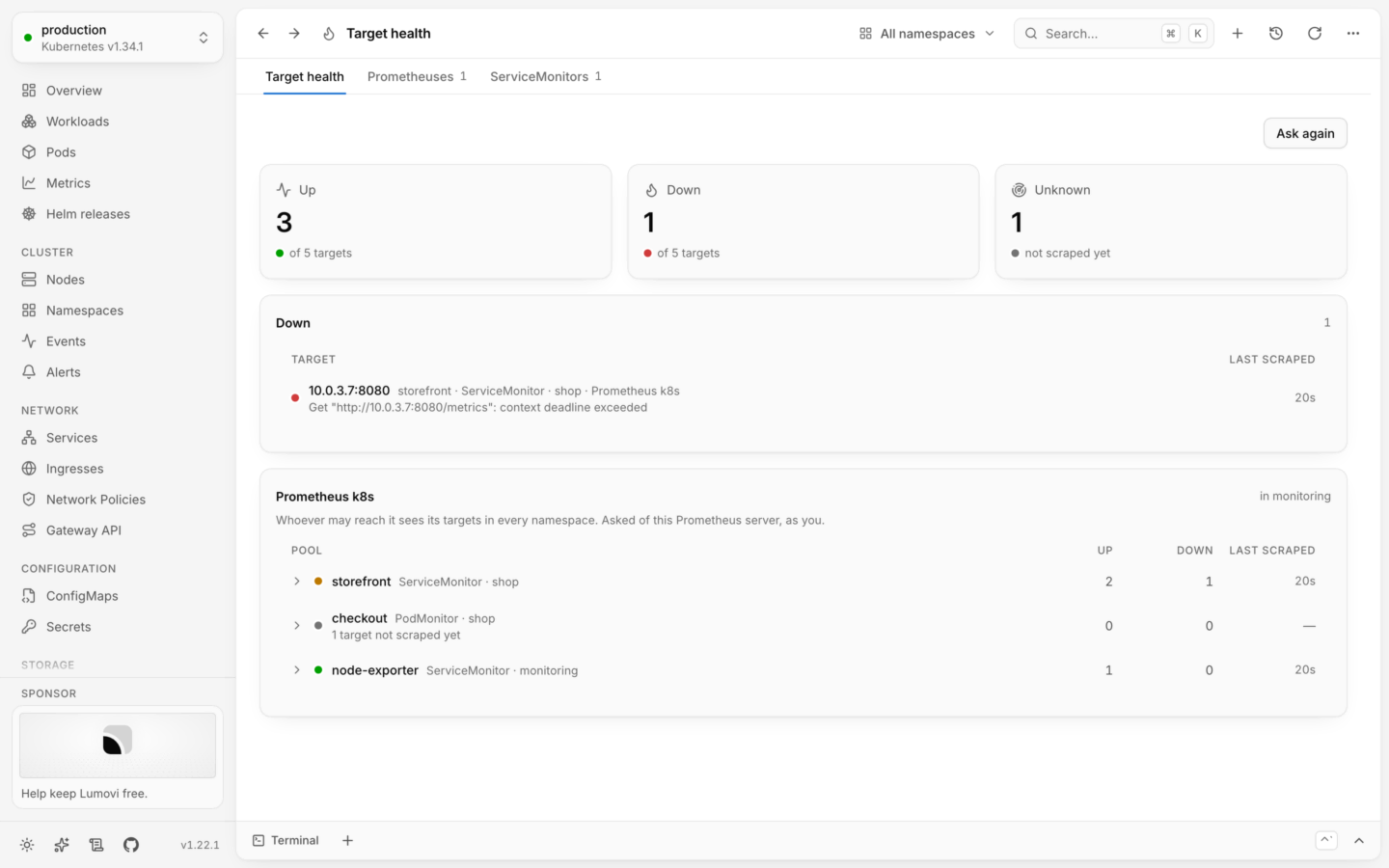
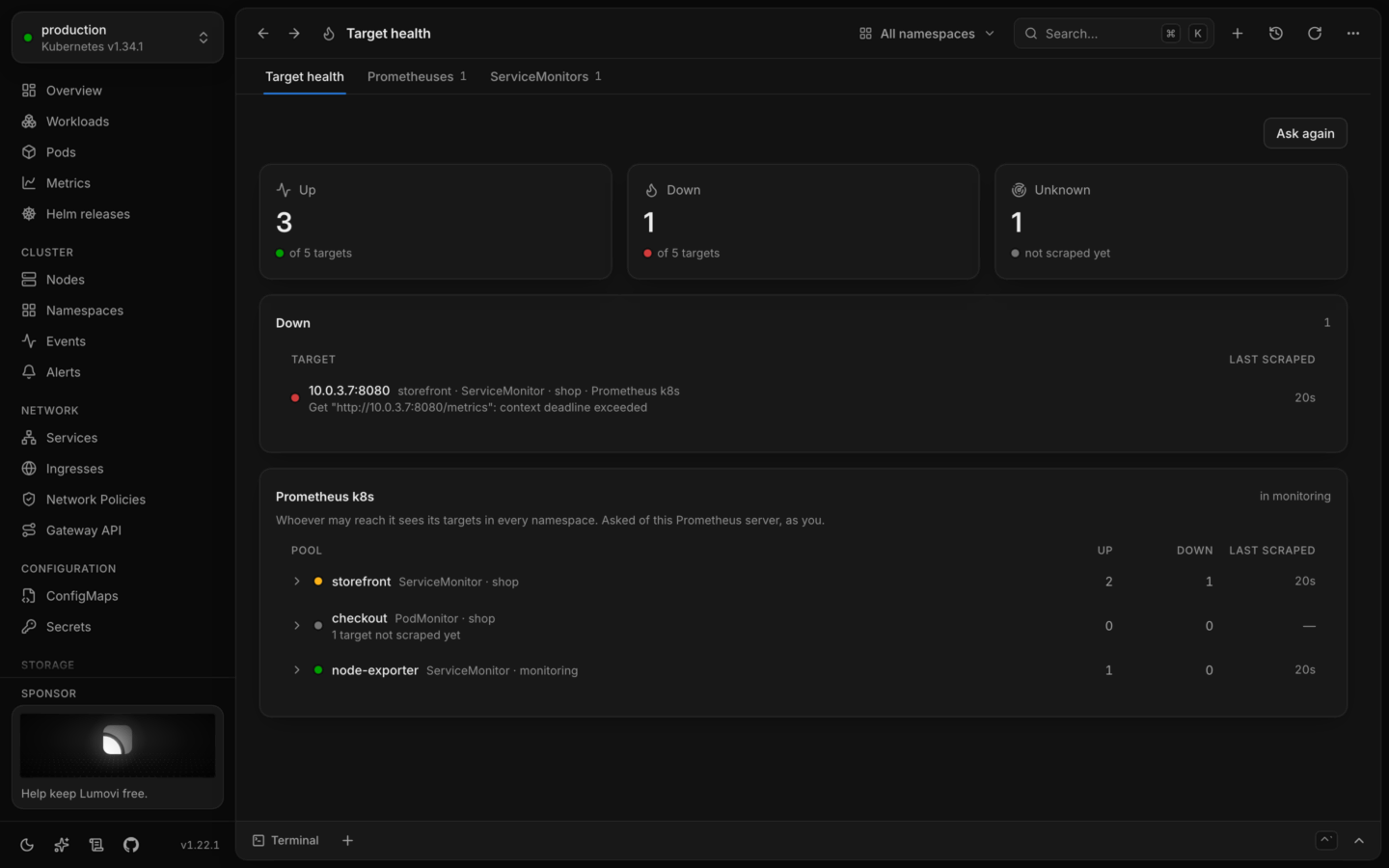
Prometheus Operator’s Target health.
- Target health: how many scrape targets are up, down and not scraped yet; the targets that are down, in one list, each with its last error; then a card for each namespace’s Prometheus, with its scrape pools, worst first, named for the ServiceMonitor, PodMonitor or Probe they come from, and each pool’s targets. From Prometheus Operator 1.1.4 (Lumovi-plugins 1.4.1: in the desktop app, Update… under Newer plugins installs it), the counts are of what was read. Until one namespace’s server answers there are none, and each card says why its server didn’t. Where only some answered, they say so: “of 12 targets, from 1 of 2 namespaces”, and a Down or Unknown of zero isn’t green. Up is green only where a target is up.
prometheus-operated Service the operator makes there, on its port web, for /api/v1/targets?state=active, as you, so you need get on services/proxy in that namespace. Its entry under All plugins says so first, in red.
- What reaches its code. Prometheus answers with every active target it discovered, each with the labels and annotations of the Services and Pods behind it, from every namespace it watches. The page shows each target’s pool, instance, health, last scrape and last error.
- Who sees what. A Prometheus scrapes across namespaces: whoever may reach its server sees all its targets, whatever else they may see in the cluster. Each card says so under its title: “Whoever may reach it sees its targets in every namespace.”
- Several in a namespace. The
prometheus-operatedService sends each ask to one of their pods, so the card shows whichever answered, and says so. - Turning it off. Run its code on its entry, or
pluginServers: offin an organization’s policy.
Rook Ceph
Rook: Ceph clusters, and the pools, filesystems and object stores on them. Rook Ceph, under Storage (rook-ceph): CephCluster, CephBlockPool, CephFilesystem, CephObjectStore, CephObjectStoreUser, CephNFS, ObjectBucketClaim.
A Ceph cluster shows Ceph’s own health: HEALTH_OK, HEALTH_WARN or HEALTH_ERR, or Failed, and is in progress with its phase until Ceph reports. Pools, filesystems, object stores and their users are Ready, Failed, or in progress with their phase. A bucket claim is Bound, Failed, or in progress.
Sealed Secrets
Sealed Secrets: secrets encrypted for the cluster’s controller, which unseals each into a Secret of the same name. Sealed Secrets, under Configuration (sealed-secrets): SealedSecret.
A sealed secret is Unsealed, Can’t unseal, or Waiting for the controller.
Strimzi
Strimzi: Kafka clusters, their topics and users, and Kafka Connect. Strimzi, under Plugins (strimzi): Kafka, KafkaNodePool, KafkaTopic, KafkaUser, KafkaConnect, KafkaConnector, KafkaMirrorMaker2, KafkaBridge, KafkaRebalance.
A Kafka cluster is Ready, Ready, with warnings when Strimzi fixed or ignored something, critical with Strimzi’s reason, or Reconciling. Topics, users and Kafka Connect are Ready, or critical with the reason. A connector is Running, paused or stopped as its state says, or critical. A rebalance is Waiting for approval once Cruise Control has proposed one, Done, critical when it stopped or isn’t ready, and otherwise in progress.
- Pause pauses a connector, and Resume runs it again. Restart… restarts the connector and its tasks.
- Approve… lets Cruise Control start moving partitions as it proposed. It’s offered while a rebalance waits for approval.
- Refresh asks Cruise Control for a new proposal.
- Stop… stops a rebalance in progress; what it moved stays moved. It’s destructive, so it asks first.
Tekton
Tekton: pipelines and tasks, and their runs. Tekton, under Plugins (tekton): PipelineRun, TaskRun, Pipeline, Task.
Runs are Succeeded, Cancelled, critical with Tekton’s reason when they failed, and otherwise in progress with the reason. A pipeline run that’s waiting to start is Pending.
- Stop… starts no more tasks: the running ones finish, and then its finally tasks run. Cancel… stops its running tasks at once, and its finally tasks don’t run. Both are offered while a run is running.
- Run again… creates a new pipeline run with a finished one’s pipeline, parameters, workspaces and timeouts.
- Run… creates a pipeline run of the pipeline, with no parameters or workspaces of its own.
- Runs lists the runs of a pipeline or a task.
Traefik
Traefik: its routes, and what they pass requests through. Traefik, under Network (traefik): IngressRoute, Middleware, IngressRouteTCP, IngressRouteUDP, MiddlewareTCP, TraefikService, TLSOption, ServersTransport. Traefik services, TLS options and servers transports have no view.
A middleware’s details say what it does: where it redirects to, the prefixes it strips, its rate limit, the sources it allows, where it forwards authentication, and the middlewares it chains.
Trivy
Trivy Operator: what it found scanning the cluster. Trivy, under Plugins (trivy-operator): VulnerabilityReport, ConfigAuditReport, ExposedSecretReport, RbacAssessmentReport, ClusterRbacAssessmentReport, ClusterComplianceReport.
Reports are 2 critical when they found critical issues, 5 high when the worst are high, and otherwise No critical or high. A compliance report is 3 failing or Compliant.
Velero
Velero: backups of cluster resources and volumes. Velero, under Plugins (velero): Backup, Restore, Schedule, BackupStorageLocation. Backup storage locations have no view.
Backups and restores are Completed, Partially failed, Deleting, critical with Velero’s phase when they failed, or in progress with it. A schedule is Enabled, Paused, or Failed validation.
Vertical Pod Autoscaler
The Vertical Pod Autoscaler: the requests it recommends for workloads, and whether it applies them. Vertical Pod Autoscaler, under Plugins (vertical-pod-autoscaler): VerticalPodAutoscaler.
An autoscaler is Recommending, Gathering data, Low confidence, No pods when no pods match it, or Unsupported.
Change mode… asks for the Mode: Off only recommends, Initial sets requests on new pods, Recreate also evicts pods to update them, and InPlaceOrRecreate resizes them in place where it can. Undo puts the previous mode back.
VictoriaMetrics
The VictoriaMetrics operator: VictoriaMetrics and VictoriaLogs, what they scrape, and their alerting rules. VictoriaMetrics, under Plugins (victoriametrics-operator): VMCluster, VMSingle, VMAgent, VMAlert, VMAlertmanager, VMAuth, VMServiceScrape, VMPodScrape, VMRule, VLSingle, VLCluster.
Everything is Operational or Failed, as the operator reports it. Servers can also be Paused, or in progress while they’re created or updated.
Volume snapshots
Volume snapshots: point-in-time copies of volumes, taken by CSI drivers. Volume Snapshots, under Storage (volume-snapshots): VolumeSnapshot, VolumeSnapshotContent, VolumeSnapshotClass.
A snapshot is Ready, Taking, or Failed.
CustomResourceDefinitions
CustomResourceDefinitions themselves get a view too: their list shows each one’s Kind, Group, Scope and Versions, and their details add the plural, short names and stored versions. That view is Lumovi’s own, not a plugin’s: API resources says Lumovi under Shown by for it, and that’s where to open them from.Changing one of Lumovi’s
A plugin of yours with the name of one of Lumovi’s is used in its place, all of it. The name is the one each section above gives after the plugin’s label, likeflux. Copy the file you want to change from Lumovi’s plugins into ~/.lumovi/plugins, edit it, and press ⌘R (Ctrl+R on Windows and Linux). API resources then names your file under Shown by for its kinds, and All plugins says on its row that it’s in use in place of Lumovi’s. If your copy has a problem, none of it is used, and its row says that Lumovi’s is shown instead.
It’s the whole plugin or none of it: a kind is one plugin’s, so a plugin of yours under another name can’t show a kind one of Lumovi’s has. See Whose a kind is.
In your cluster: put your plugins in the chart’s
plugins value. See Plugins for everyone.Contributing a plugin
Adding a tool needs no code, and is a welcome first contribution. To ask for one instead, open a Support a tool issue. The plugins live in Lumovi-plugins, a folder each underplugins/. Its contributing guide has the details, and how to set up the checks; in short:
1
Make its folder
Make
plugins/<name>/, named as the plugin is, with its four files: plugin.yaml, README.md (what it’s for, in a line), crd-sources.json, and crds.json, which the next step writes.2
Pin the tool's CRDs
In
crd-sources.json, name the tool’s release and the URLs of its CRD manifests, and run npm run crds -- <name>. That keeps what the check needs of them in crds.json.3
Write its plugin
In
plugin.yaml, with a comment linking to the tool: one kind: Plugin, with its label and kinds, and under views: a view for each kind (or group of kinds) worth more than the generic columns. Status rules are where views help most: say what healthy, in progress, failing and paused look like for this tool.4
Check it
Run
npm run check. It runs Lumovi’s own checker, which checks every kind, path, template, link, related list and action against the CRDs you pinned, so a misremembered field fails there rather than showing nothing. Labels and annotations aren’t in schemas, so check those against the tool’s documentation, or a real cluster.5
Look at it
Put
plugin.yaml in ~/.lumovi/plugins, under the plugin’s name (<name>.yaml), while Lumovi runs against a cluster with the tool installed, and press ⌘R after each change. It’s read as one of yours, held to the same checks.crd-sources.json, run npm run crds -- <name> and npm run check, and raise the plugin’s spec.version.
Plugins
A tool’s entry in the sidebar, and its page.
Plugin format
Every field a plugin can have.